


This article addresses the Import Duty and Import VAT for cross-border sellers who sell in the Thailand market.

Introduction
In compliance with Thailand’s Customs Department, international shipping orders are subject to import VAT; and international shipping orders created from 21st January, 2026, Thailand time (GMT+7) onwards will be subject to import duties. The platform will provide a reference for duty calculation, and allow sellers to adjust the displayed price accordingly.

Import Duty
As regulated by Thailand Customs Department, starting 21st January, 2026, all imported goods, with a price as low as THB 1, will be subject to assessment for import duties upon entry into Thailand, which means international shipping orders created from 00:00 21st January, 2026, Thailand time (GMT+7) onwards will be subject to import duties.
The import duty amount is calculated as:
Product price before tax * Import duty rate = Customer payment / [(1 + duty rate)*(1 + 7%)] * Duty rate
Note:
The platform will not implement duty for orders shipped from border warehouses and local (Thai) warehouses.
For existing cross-border products, the platform will not automatically update product prices. Sellers need to update product prices. Please refer to this guide.
The import duty rate is different for each product category, and can be found in this article.
Please refer to prevailing tax law and stay updated of the import duty rate.

Import VAT
Imported products are also subject to an import VAT. The VAT amount is calculated as:
(Product price before tax + import duty) * 7% = Customer payment / [(1 + duty rate)*(1 + 7%)] * (1 + duty rate) * 7%
The VAT rate, according to Thailand’s prevailing tax law, is 7%.

Checking the Amount of Tax Deducted
Sellers can check details of duty and VAT collected from each order in the order’s settlement detail, which displays the total of both import duty and VAT collected under the item “Import duty and value added tax” (进口关税和增值税)

Important Note
The tax amounts will be deducted from the calculation of all platform fees. Hence, starting 21st January, 2026, sellers will see decreases in the final platform fees charged for each order.
| Fee name | | Formula before import duty implementation | Formula after import duty implementation |
| Platform commission fee | 平台佣金 | (Subtotal before discount – seller discount) * Fee rate | (Subtotal before discount – seller discount- Import duty and value added tax) * Fee rate |
| Transaction Fee | 支付服务费 | Customer payment * Fee rate | (Customer payment – Import duty and value added tax)* Fee rate |
| IPP Handling Fee | | Customer payment * Fee rate | (Customer payment – Import duty and value added tax)* Fee rate |
| Bonus Cashback Service Fee | Bonus Cashback服务费 | (Subtotal before discount – seller discount) * Fee rate; with a cap | (Subtotal before discount – seller discount – Import duty and value added tax) * Fee rate; with a cap |
| Live Specials Service Fee | Live Specials服务费 | (Subtotal before discount – seller discount) * Fee rate; with a cap | (Subtotal before discount – seller discount – Import duty and value added tax) * Fee rate; with a cap |
| Voucher Xtra Service Fee | 折扣券活动服务费 | (Subtotal before discount – seller discount) * Fee rate; with a cap | (Subtotal before discount – seller discount – Import duty and value added tax) * Fee rate; with a cap |
| Flash Sale Or Brand Crazy Deals Service Fee | 秒杀/超品活动服务费 | (Subtotal before discount – seller discount) * Fee rate; with a cap | (Subtotal before discount – seller discount – Import duty and value added tax) * Fee rate; with a cap |
| Commerce Growth Gee | 电商增长费 | (Subtotal before discount – seller discount) * Fee rate; with a cap | (Subtotal before discount – seller discount – Import duty and value added tax) * Fee rate; with a cap |
| Campaign resource fee GMV model | 营销资源包费(GMV抽佣) | (Subtotal before discount – seller discount) * Fee rate; with a cap | (Subtotal before discount – seller discount – Import duty and value added tax) * Fee rate; with a cap |
| External traffic marketing fee | 站外流量推广费 | (Subtotal before discount – seller discount) * Fee rate; with a cap | (Subtotal before discount – seller discount – Import duty and value added tax) * Fee rate; with a cap |

Product listing guide
- Guidance for Existing Products:
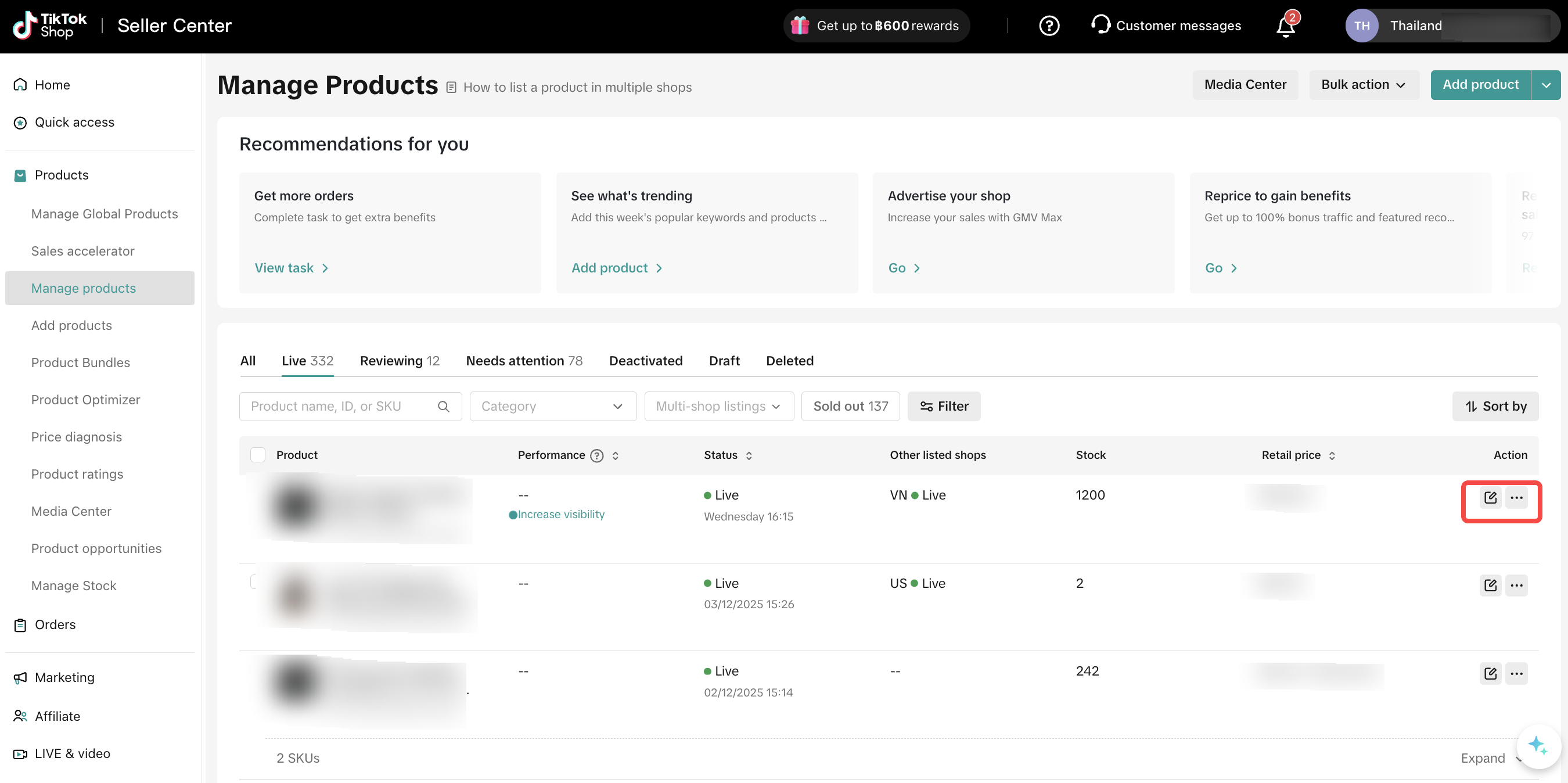
For sellers currently selling cross-border products listed on the Thailand site, it is recommended to consider the recent tariff adjustment and adjust the prices of these existing cross-border products. The operation process for in-stock products is as shown below.
a. Edit Single Product Price
Step 1: In your Thailand shop, on the product management page, click the “Operation” button.
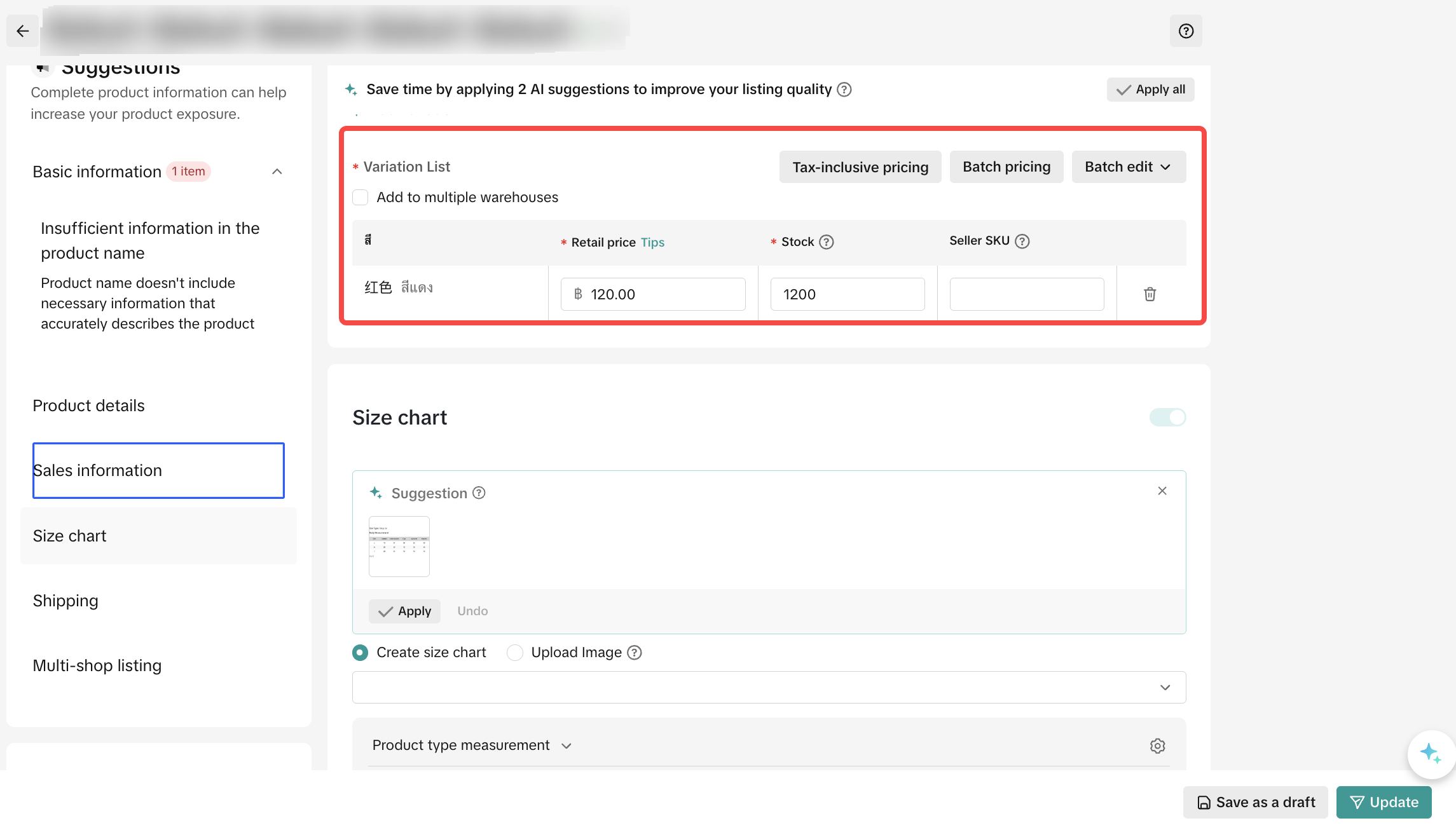
Step 2: Enter the product information editing page. In the “Sales Information” section, proceed with price editing.
Step 3: Check the price information in the sales details. Click “Price Based on Pre-tax Price”. The system will calculate the current retail price for you based on the prevailing market tax rates.
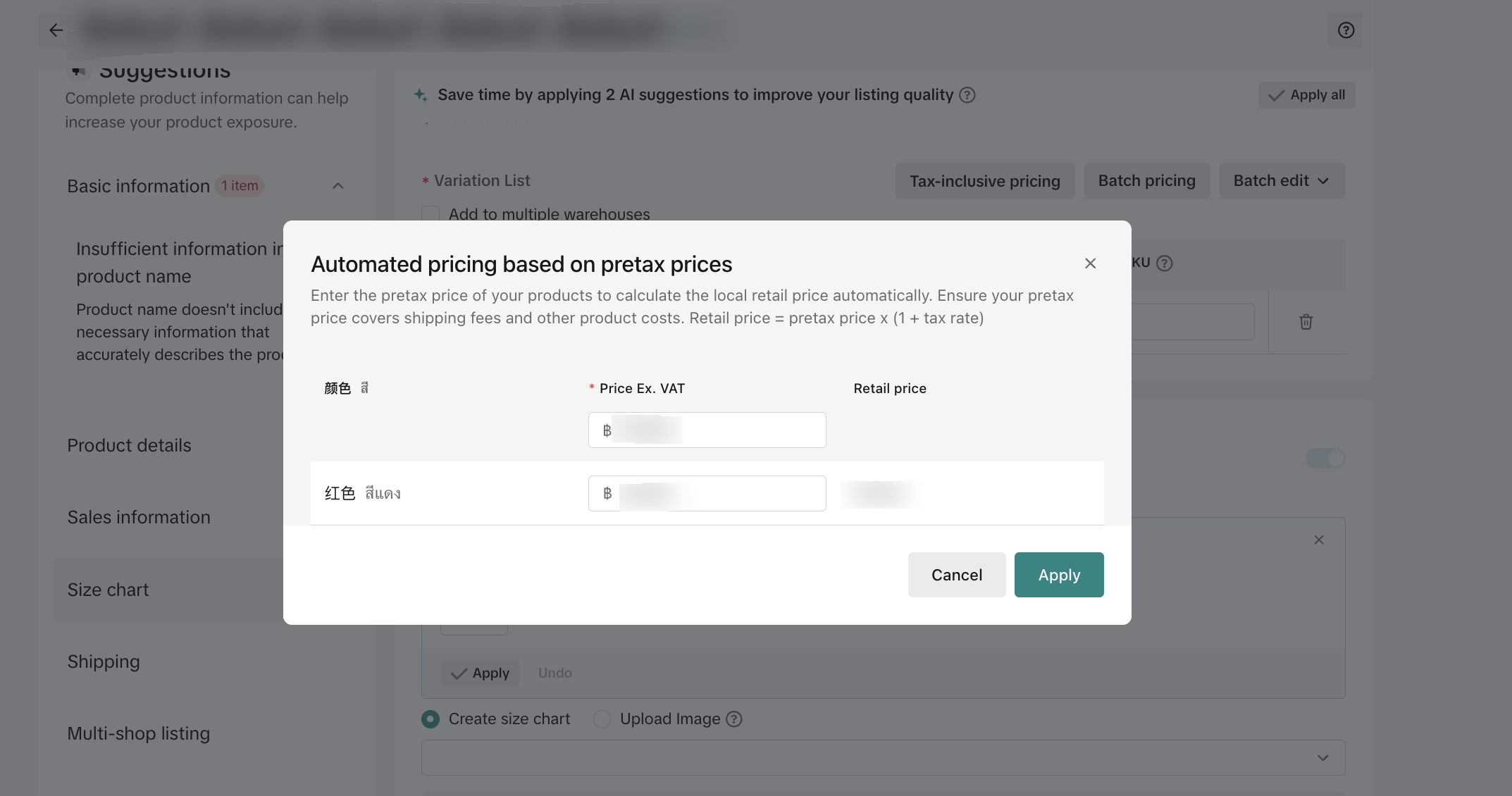
*Note: The “Price Based on Pre-tax Price” tool can only help you calculate the current post-tax price. Please be aware that the retail price suggested by the system will not include additional costs such as cross-border logistics shipping fees. It is recommended that you consider product cost, profit, domestic shipping, and other factors when adjusting your price.
*Note: The images are screenshots from a simulated environment for reference only.
b. Bulk Edit Product Prices
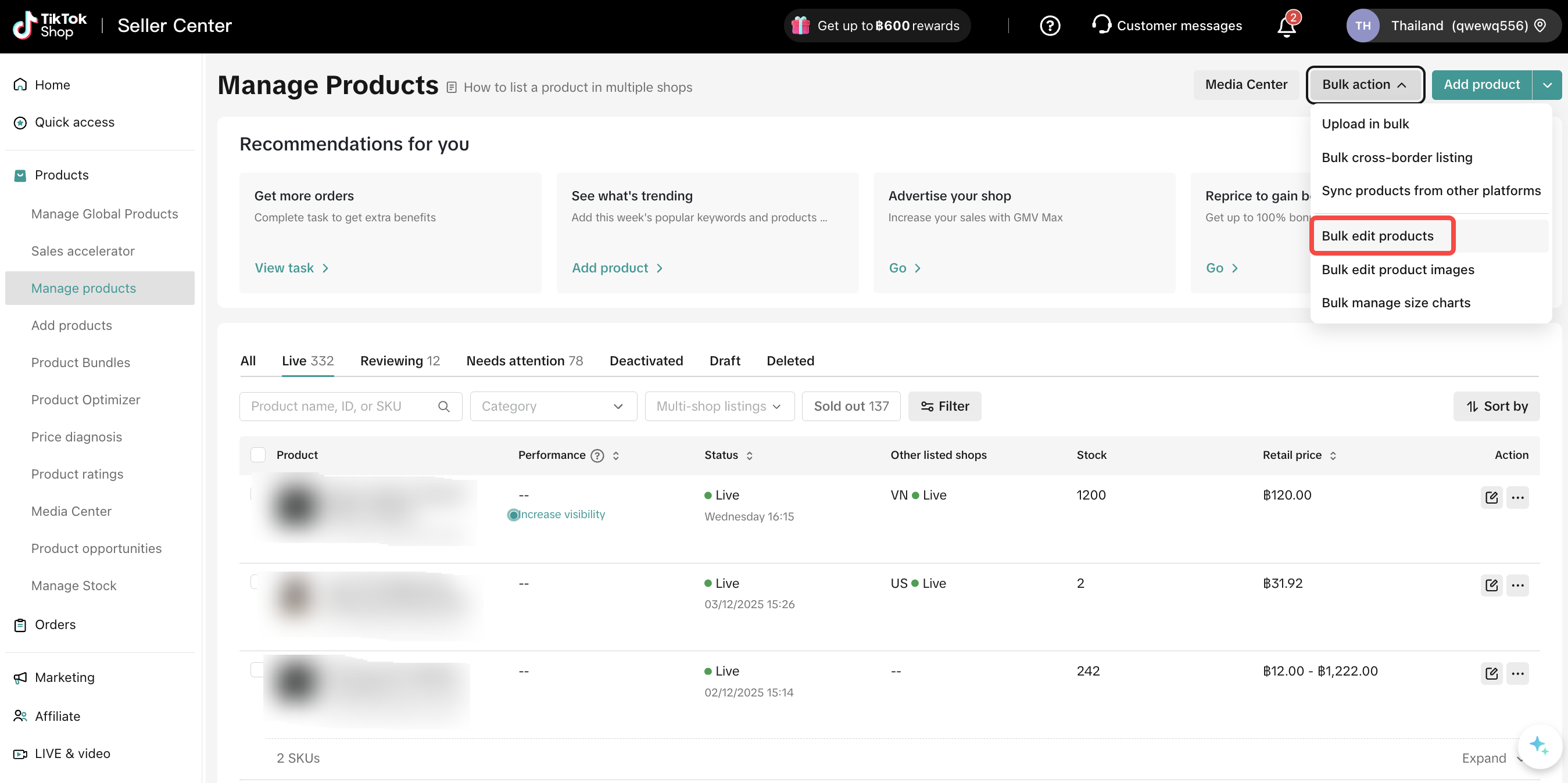
Step 1: Select “Bulk Edit Products” from the “Bulk Operations” dropdown menu.
Step 2: Select the products you wish to edit and download the template.
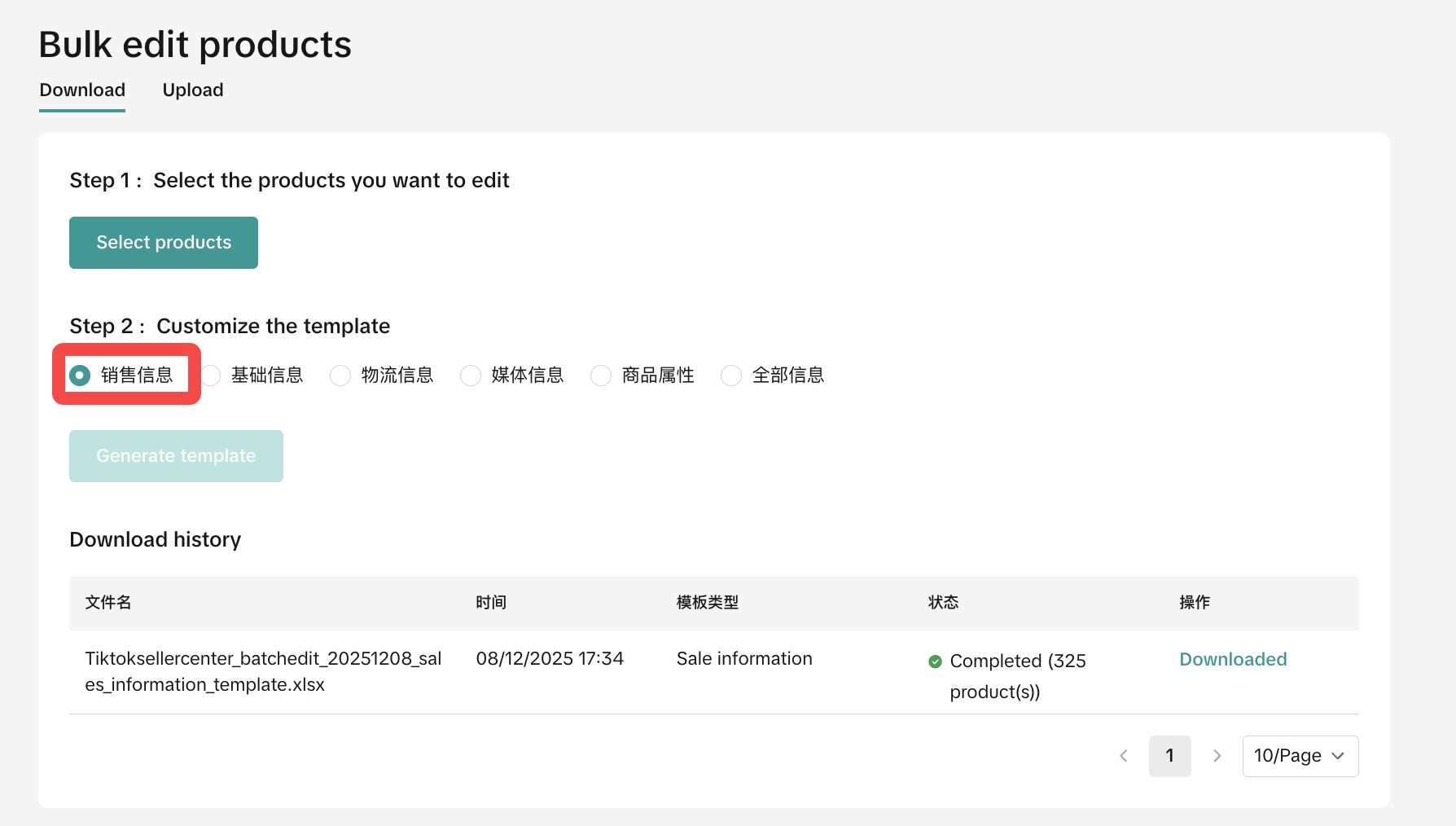
Step 3: Edit the corresponding product retail prices in the Excel template.

*Note: The bulk edit template for sales information does not directly display the post-tax price; you need to edit it manually. If you are unsure of the post-tax price, you can refer to the retail price suggestion provided by the “Price Based on Pre-tax Price” component mentioned in step a. Please be aware that the retail price suggested by the system will not include additional costs such as cross-border logistics shipping fees. It is recommended that you consider product cost, profit, domestic shipping, and other factors when adjusting your price.
*Note: The images are screenshots from a simulated environment for reference only.
*Note: If you are a seller using a third-party ERP system for product management, please be aware of this change in the product tariff collection policy and complete the price modifications for your in-stock products within the corresponding third-party system.
- Guidance for Adding New Products
Starting from 00:00 on 21st January, 2026 (GMT+7, Thailand Time), when sellers publish new global products (for the Thailand site only), the “Price Based on Pre-tax Price” calculator component will help calculate the current post-tax price for you when displaying the retail price while you are filling in the sales information for new products.
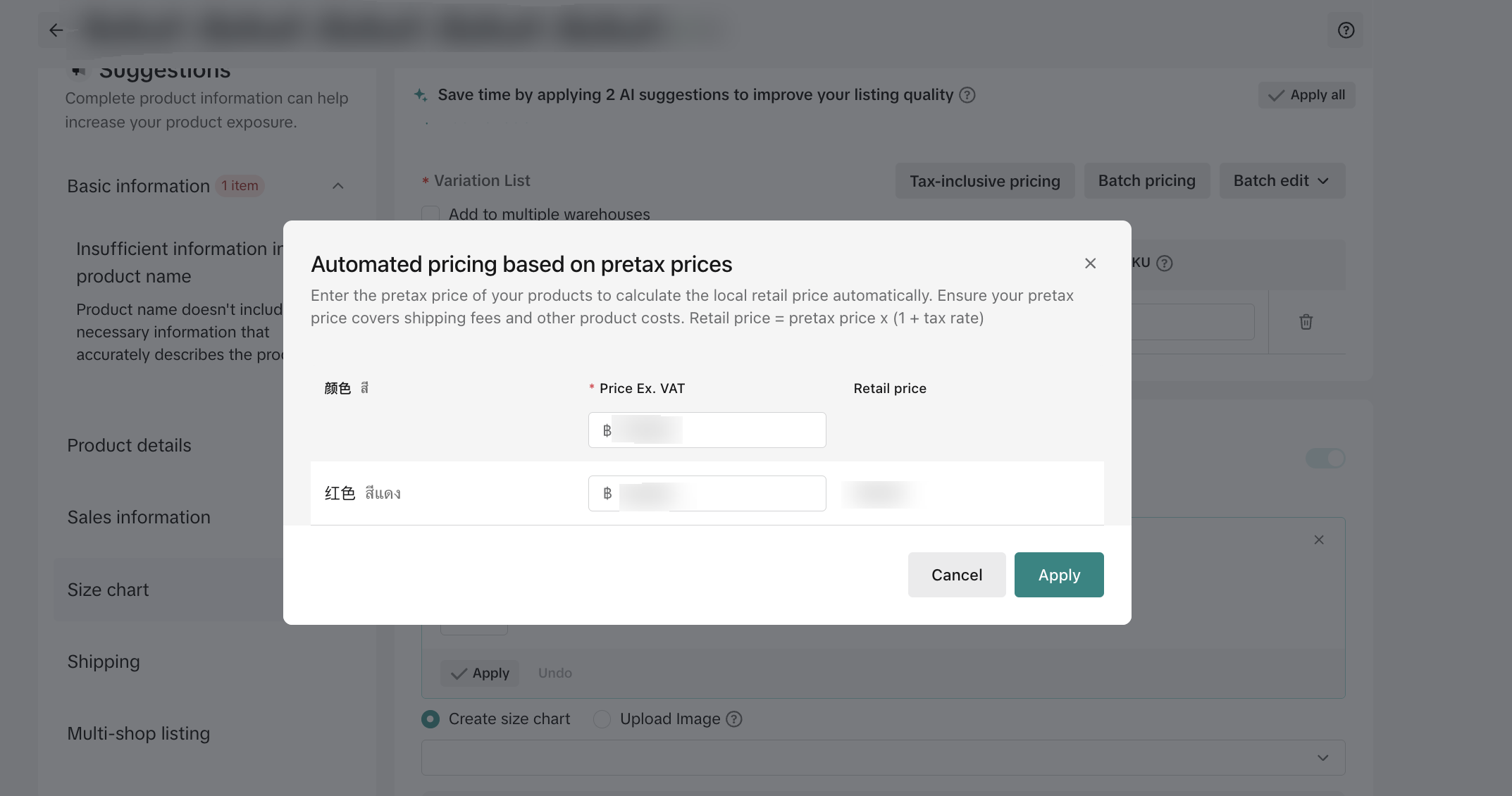
*Note: The “Price Based on Pre-tax Price” tool can only help you calculate the current post-tax price. Please be aware that the retail price suggested by the system will not include additional costs such as cross-border logistics shipping fees. It is recommended that you consider product cost, profit, domestic shipping, and other factors when adjusting your price.
*Note: The images are screenshots from a simulated environment for reference only.