


This article explains the Bonus Extra Program (BXP) and how it can enhance your selling journey on TikTok Shop by further encouraging consumers to make purchases. Through BXP, customers can enjoy additional discounts and cashback, helping drive more sales for your business.
Register for the Bonus Extra Program here:
- Cross-border sellers: https://seller.tiktokglobalshop.com/promotion/program/bundle/detail/7530556850246878993?channel=Seller_Academy&track_id=f457fe07d68d021d77bd946bb2d40c32&shop_region=SG

What is the Bonus Extra Program (BXP)?
The Bonus Extra Program (BXP) is an enhanced version of the Bonus Cashback Program (BCP), providing sellers with the most attractive vouchers under a single service fee. These vouchers are:
Bonus Cashback Vouchers
LIVE Specials Vouchers
BXP sellers also enjoy
More attractive Shipping Vouchers
More attractive Product Vouchers
This program offers sellers a seamless and convenient way to provide the best mix of vouchers to customers, leading to increased order conversions.
Bonus Cashback Vouchers can be stacked with Shipping, Product and LIVE specials Vouchers on TikTok Shop, maximizing their value. Sellers enrolled in BXP can also benefit from a higher incentive rate during campaign periods compared to non-BXP sellers.

What is Bonus Cashback?
BonusCashback (or Bonus) is an in-app reward whereby users can earn and use it to enjoy discounts on their purchase at checkout. Bonus can not be transferred , exchanged or refunded for cash or monetary value of any currency.
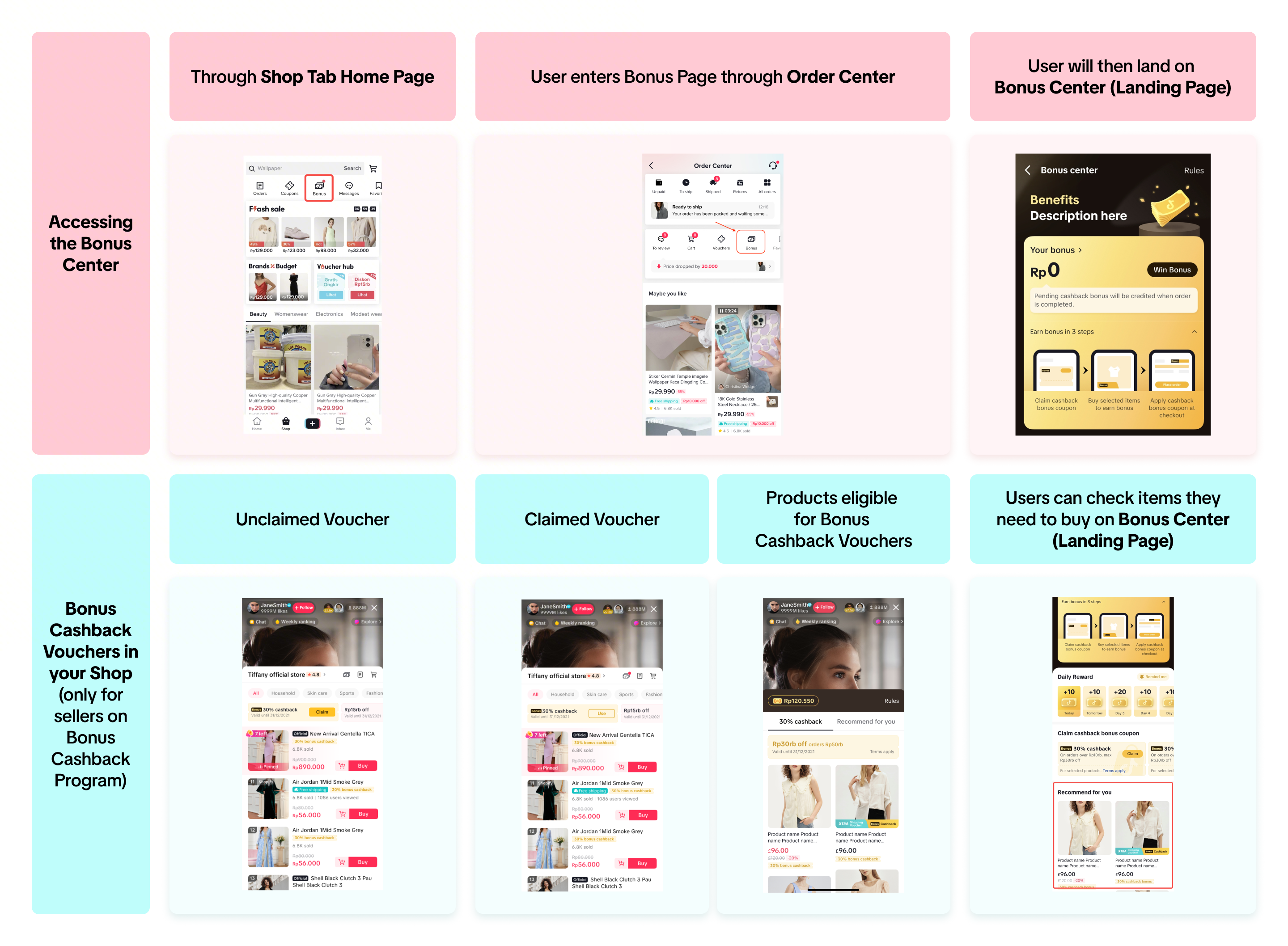
Where users will see Bonus Cashback
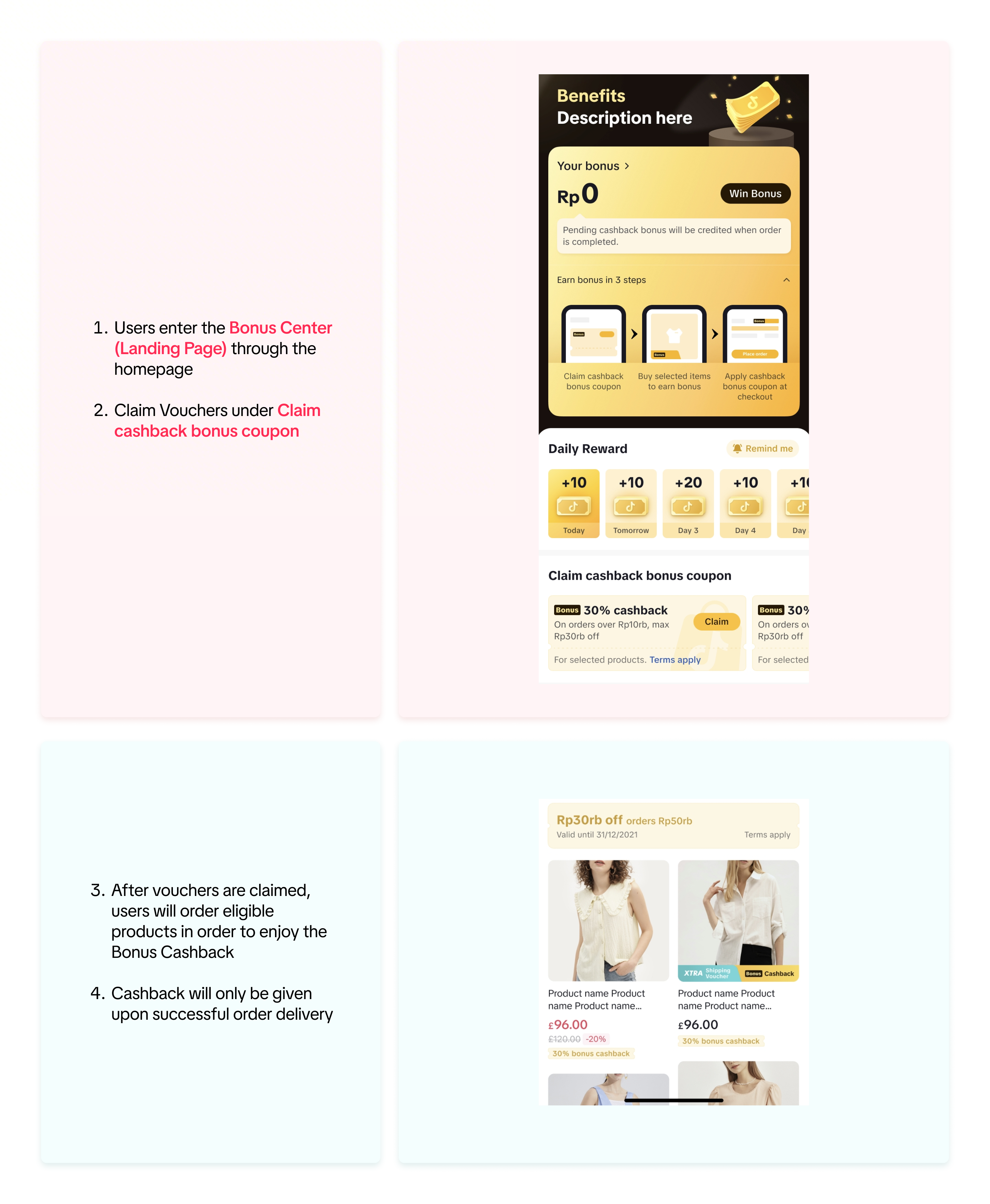
How users can earn Bonus Cashback
Through Check-In
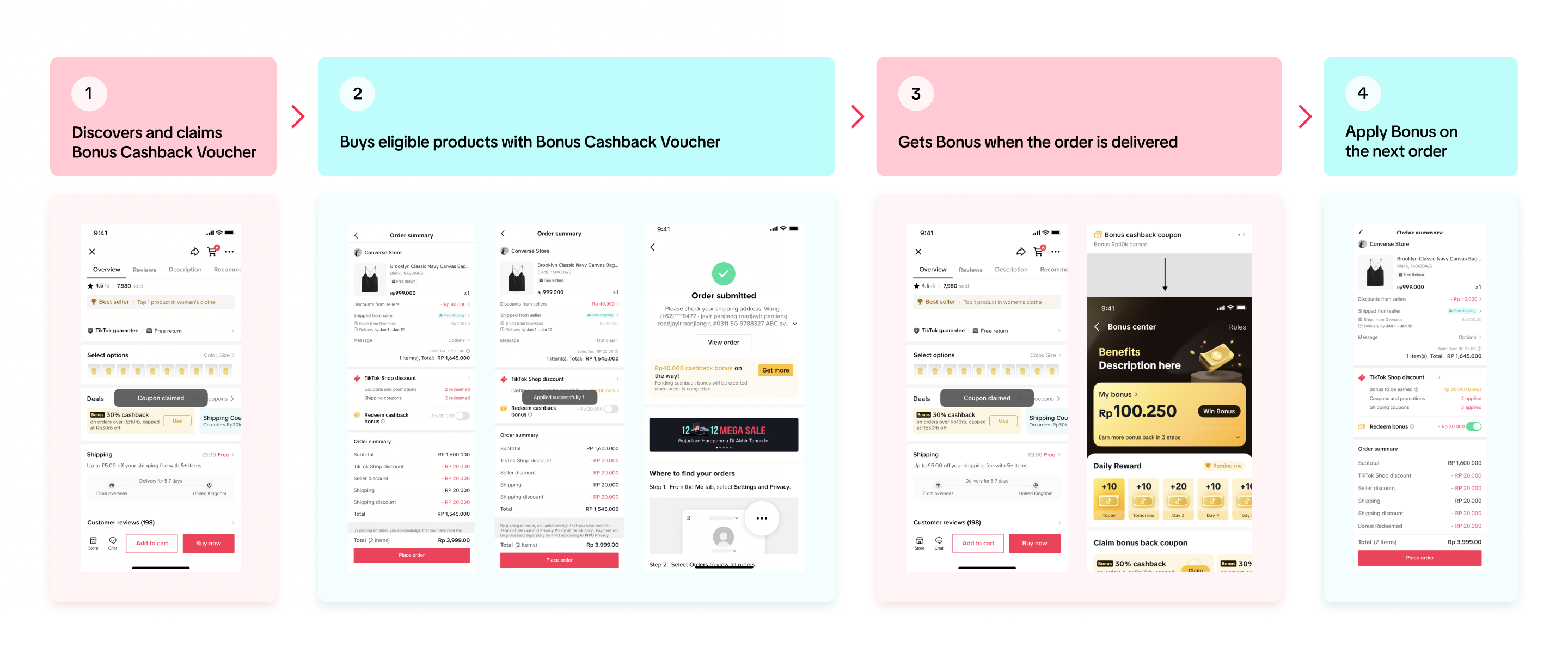
On Shop Page – Bonus Cashback Program
Users will find Bonus Cashback Vouchers on your Shop page when you sign-up for Bonus Cashback Program.

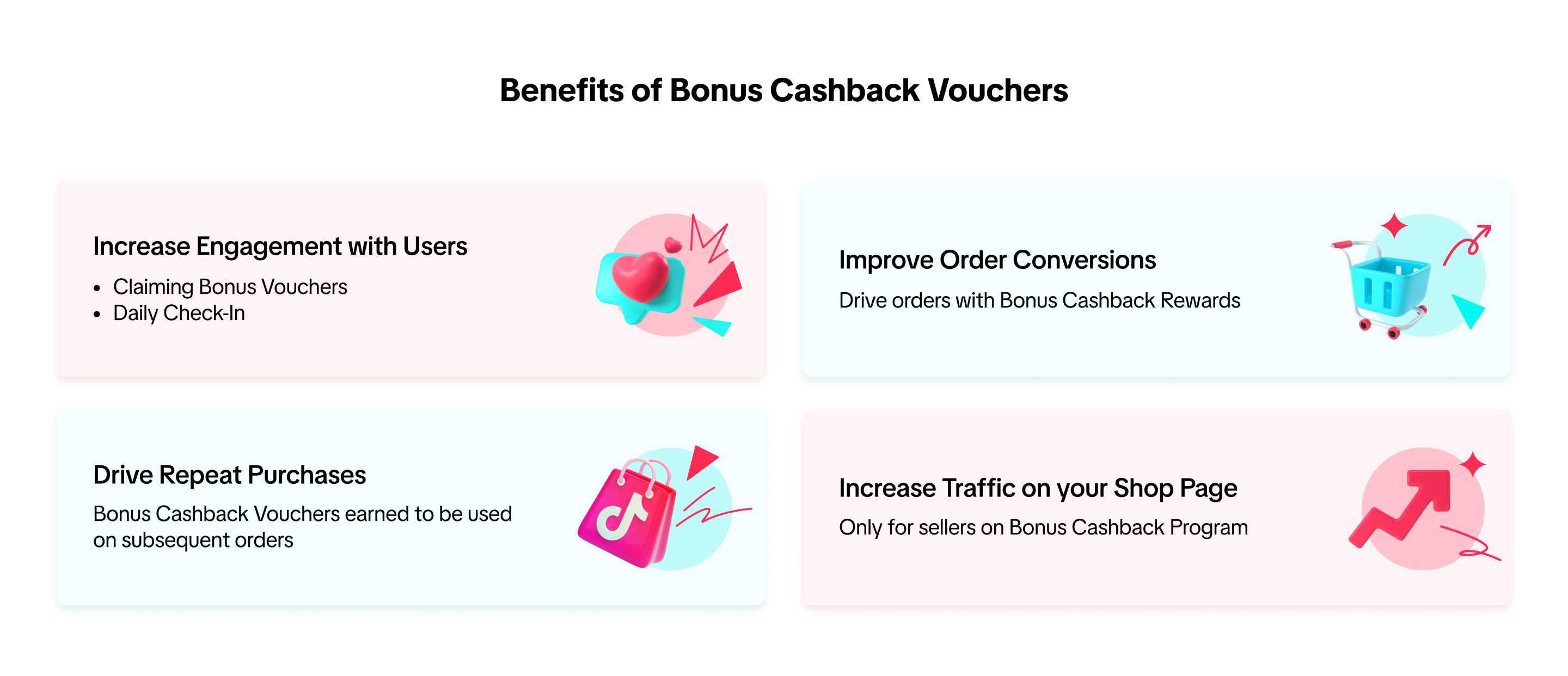
Why should you join the Bonus Extra Program (BXP)?
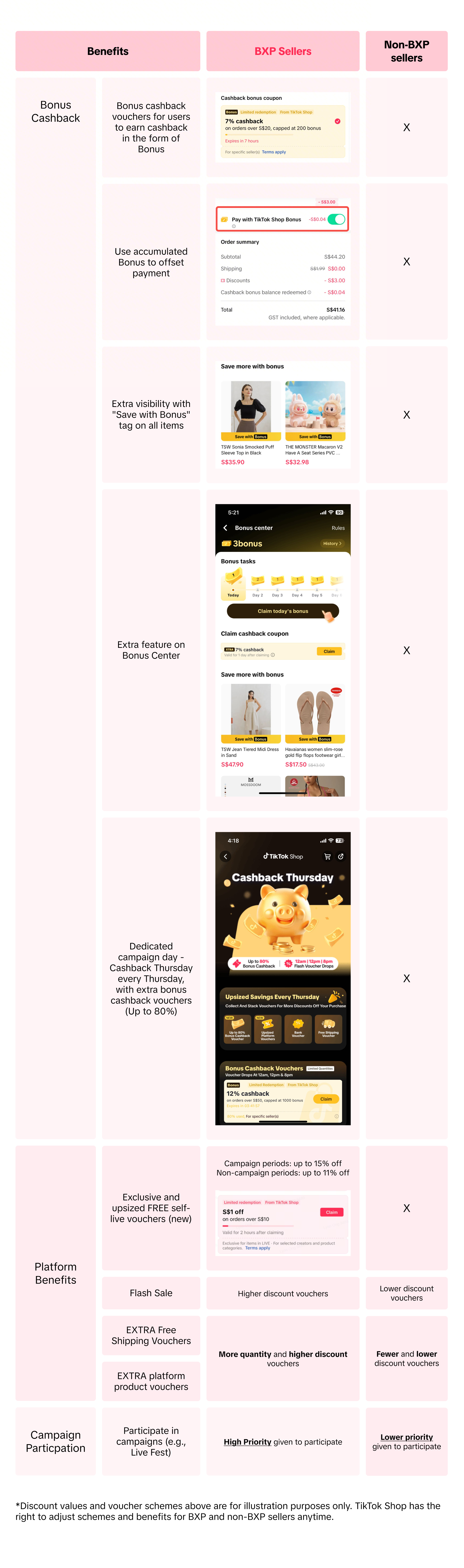
Bonus Extra Program Service Fee
The Bonus Extra Program (BXP) service fee is charged upon a successfully completed order (ie. Orders that are delivered to buyers, with no pending return/refund request).
| Cluster | First Product Category | Second Product Category | BXP Service Fees |
| Electronics | Computer & Office Equipment | Computer Accessories | 5.45% |
| | Pre-Owned | Refurbished Phones & Electronics | 3.27% |
| | Phones & Electronics | Phone Accessories | 3.27% |
| | | Smart & Wearable Devices | 3.27% |
| | | Tablet & Computer Accessories | 3.27% |
| | | Universal Accessories | 3.27% |
| | | Audio & Video | 3.27% |
| | | Education Devices | 3.27% |
| | | Gaming & Consoles | 3.27% |
| | | Cameras & Photography | 3.27% |
| | Computers & Office Equipment | Data Storage & Software | 3.27% |
| | | Desktop & Laptop Components | 3.27% |
| | | Desktop Computers, Laptops & tablets | 3.27% |
| | | Office Equipment | 3.27% |
| | | Network Components | 3.27% |
| FMCG | Baby & Maternity | Formula Milk & Baby Food | 3.27% |
| | | Baby Care & Health | 3.27% |
| | Beauty & Personal Care | Personal Care Appliances | 3.27% |
| Lifestyle | Household Appliances | Commercial Appliances | 3.27% |
| | | Kitchen Appliances | 3.27% |
| All other categories | | | 5.45% |
| – Service Fees include 9% GST – Service Fee cap is S$30 per item – The service fee applies to all successfully completed orders from participated shop, no matter the order has voucher applied or not | | | |
The calculation of the service fee would be as follows:
(Net Product Price – Any Seller Funded Discounts) * Service Fee Rate %
| No. | Price of the Item | Shipping fee after discount | Seller Discount | Platform Discount | Buyer paid | Service Fee for BXP (Net Product price – any seller funded discount) |
| Example 1 | 160 | 2 | -20 | -5 | 137 =160+2-20-5 | $7.63 (160-20) * 5.45% |
| Example 2 | 600 | 2 | -10 | -10 | 582 =600+2-10-10 | $30 (600-10) * 5.45% = $32.10, but cap at $30 |
| Note – Service fee cap is S$30 per item per program, see example 2 on how the service fee cap works | | | | | | |
Successfully completed orders are defined as orders which are not returned / refunded after delivery.
Whether the order will be charged a service fee depends on whether the order has been successfully completed or not;
When an item has not been shipped and the user cancels the order or fails to pay for the order online, the service fee will not be charged;
When the item has been delivered and the user returns/refunds the order, the service fee will first be charged then refunded.

How to check your Program Fee?
You can check your Program Fee on Seller Center > Finance > Settled records > View Details
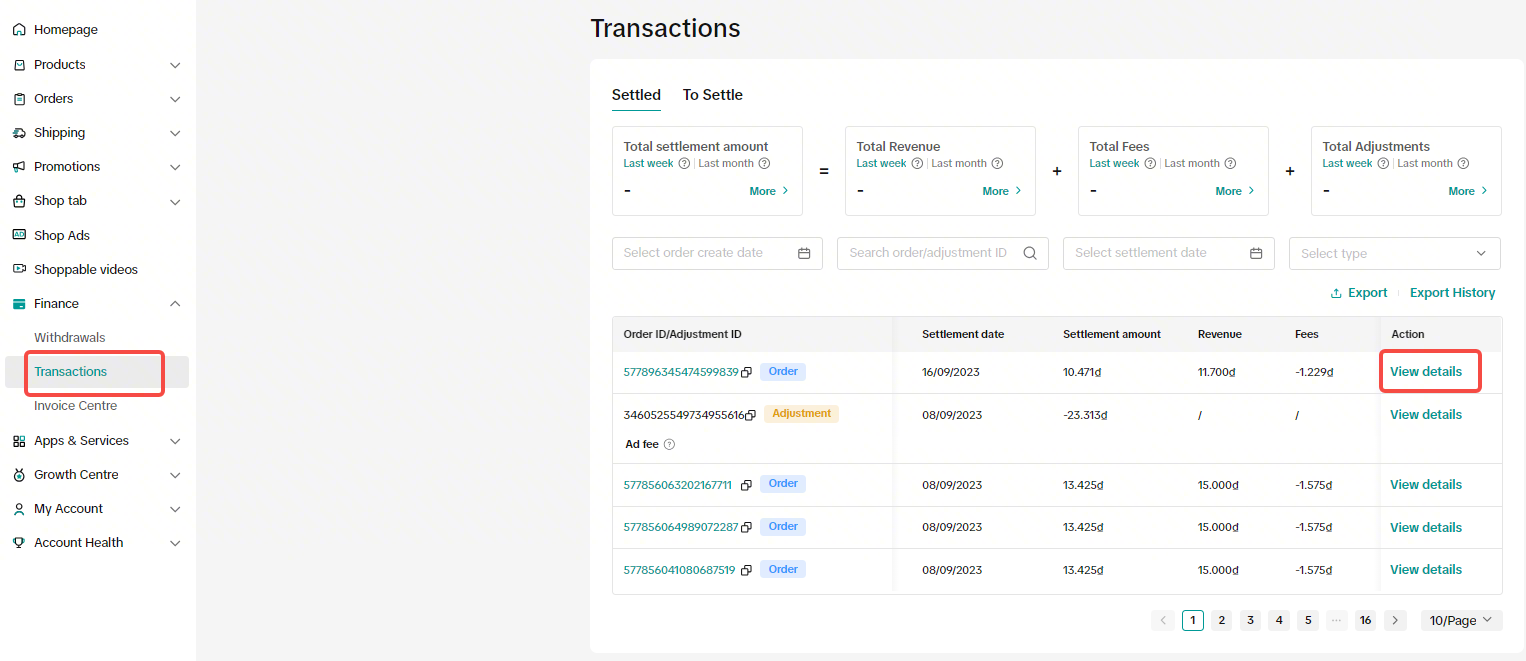
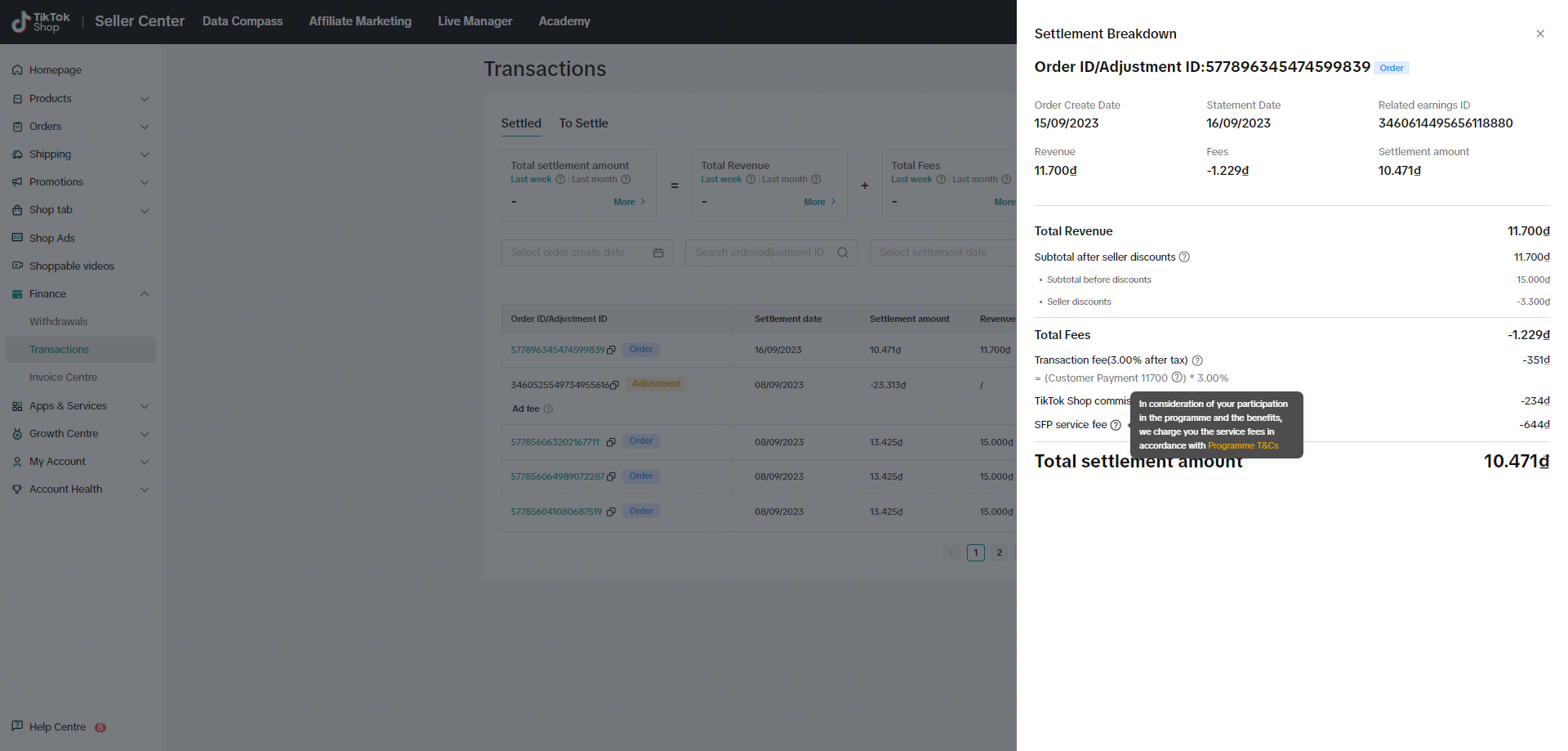
*This is a test account with dummy data for reference only. The actual interface and features may vary.

How to join the BXP program?
Register for the Bonus Extra Program here:
CB:https://seller.tiktokglobalshop.com/promotion/campaign/detail/7418428002616264449?shop_region=SG
Alternatively, you can sign up through the Seller Center:
Seller Center > Campaigns
Find “Bonus Extra Program” using the search function
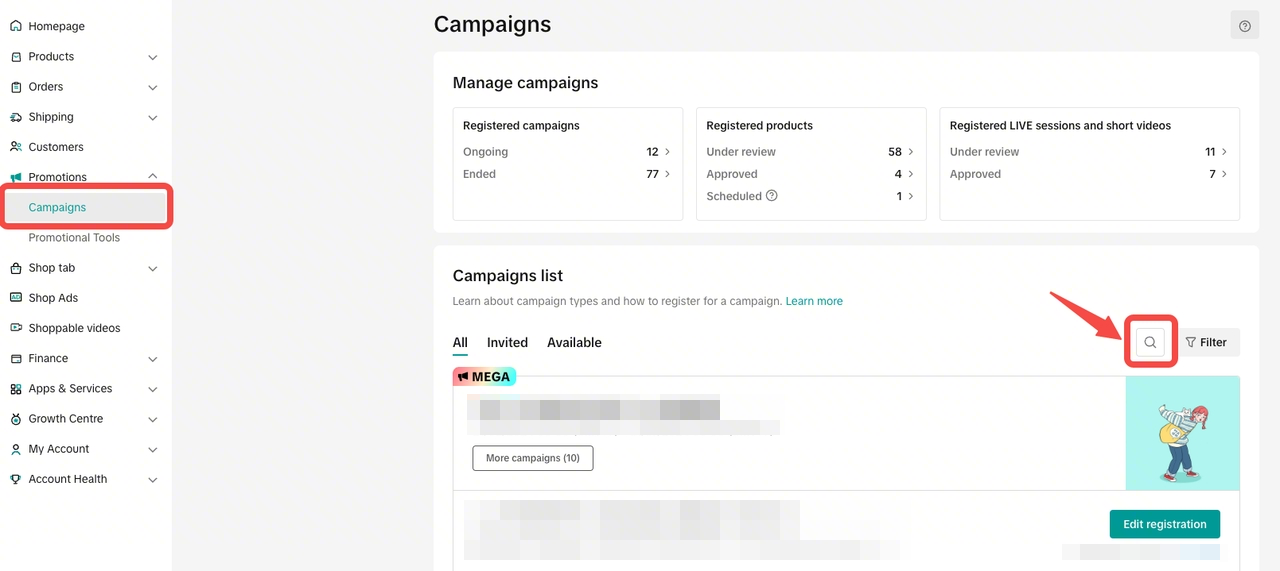
Click Register
Read the Campaign Details and Agree to the terms and conditions to register!

How do I leave the Bonus Cashback Program?
We highly recommend that you stay in the Bonus Cashback Program as it is a program designed to grow our sellers’ business objectives on the platform. If you still wish to opt out of this program, you can follow the steps below or contact your Account Manager for assistance.
Step 1: Click Registration Record on the Campaign Details page
Step 2: Click Withdraw in the Action column, to apply for withdrawal from the campaign
Step 3: Wait for your request to be approved. The campaign registration status will change from Approved or Suspended to Withdraw Under Review
If you would like to cancel your withdrawal request, click the Cancel Withdraw button.
If your request is approved, the registration status will change to Expired.
Please note:
The Bonus Cashback Label will no longer be added to your products.
XTRA Bonus Cashback Vouchers will no longer be applied to your products.
For orders with Xtra Bonus Cashback Vouchers that were processed before withdrawal from BXP, the service fee will be charged as normal.
For orders placed after withdrawal, the service fee will not be charged.

Frequently Asked Questions
- Who can join the Bonus Extra Program?
Sellers who meet our operation threshold (SES >=3.0 or Violation Points < 36) are eligible to join the Bonus Extra Program (BXP). Operation threshold has been switched from ONRR to SES as of March 2025.
Check your shop’s eligibility with your AM, or contact our support team on Seller Center platform.
- How long does it take to withdraw from Bonus Extra Program (BXP)?
All withdrawal applications will take 14 days to get approved.
- What would happen if my shop doesn’t meet the required shop criteria (SES >=3.0 or Violation Points < 36)?
If the seller exceeds the criteria, the system will automatically suspend the seller from BXP until meeting the threshold again. Sellers will receive email notifications when;
a. Your shop is suspended from BXP
b. Your shop recovered & approved to be on BXP
Bonus cashback specific FAQs
- Are the Bonus & Bonus Cashback vouchers stackable with other Seller & Platform Promotions?
Yes, Bonus & Bonus Cashback vouchers can be used in conjunction with all seller & other platform promotions.
- When will the user get the Bonus after using the Bonus Cashback Voucher on an order?
Users will receive bonus(es) upon order delivery.
- How will Bonus & Bonus Cashback vouchers be applied when placing an order?
Bonus will be applied & distributed to the user based on the Discounted Price after all Campaign, Seller, Platform Promotions have been applied
The Bonus Cashback coupon minimum spend threshold is based on the Discount Price after Campaign, Seller, Platform and Bonus promotion – This price will be used to calculate the received Bonus for the buyers, based on their Bonus Cashback Voucher % value and cap.
- If a user raises a Return & Refund request for an order with Bonus, what would happen?
| Scenario | For Bonus | For Bonus Cashback Voucher |
| When the entire order is refunded (all items) | The Bonus will be returned to the customer’s account. | The Bonus Cashback Coupon will be returned to customer’s account. |
| When some items of the order are refunded (not the entire order) | Bonus will not be returned. | The Bonus Cashback Coupon will not be returned to buyer’s account. The Bonus, however, will still be awarded according to the remaining items’ value proportion when the order is completed. |
| When the item is partially refunded (ie. Only $1 is refunded out of $10 in total) | Bonus will not be returned. | Bonus Cashback Voucher will not be returned to consumer’s account. The Bonus, however, will still be awarded according to the remaining items’ value proportion when the order is completed. |
- For the daily check-in Bonus, how many consecutive days do the users need to check-in to collect the Bonus?
Users can go the Bonus Center for check-in to receive the daily rewards up to 7 days consecutively. If users forget to check in, the consecutive task will fail and they will not be able to get the following days’ reward. Users will then have to start over again from the first day.
- Does the Bonus & Bonus Cashback coupon have usage caps & expiration?
Yes, Bonus & Bonus Cashback caps and expiration mechanics when users have collected their rewards.
The Bonus validity period starts from the month of receipt & will be valid until the end of the 2nd month. Thereafter, Bonus will expire.
- I have already joined BCP. Do I have to pay more for BXP?
No, there is no change in the service fees. You can now enjoy both Bonus cashback benefits (vouchers, visibility tags, etc) and Live vouchers at the same fees!
- Where will the live vouchers be displayed?
Users will see live vouchers displayed in your own account’s liverooms while the vouchers are still valid.