


What is TikTok Shop official account?
The TikTok account that represents the official identity of TikTok Shop is called the TikTok Shop official account. This kind of account enjoys the integrated rights of the account and the shop, and will soon have the authority to operate the store’s own functions (such as store decoration). Rights and rules of TikTok shop official account refers to TikTok Shop 官方账号权益及绑定流程//Official account of TikTok Shop Rights And Rules
What is a store page?
After upgrading, the official account generates content for the merchant’s self-sold products, and sells products through short videos and livestreams. At the same time, on the TikTok profile page, the products in the store are displayed in the form of [shop], so as to establish an official account identity for consumers that the products are from the store. Consumers will build trust in this account and store. In the future, the store page will also become a traffic position for business brand marketing and event promotion.
Why do we upgrade your official account rights?
By standardizing the requirements for the consistency of the name of shop and the bound official account, the platform transparently transmits the store page in the entire transaction link of the official account, so as to establish consumers’ awareness of the store identity of the official account, thereby enhancing their trust in the official account. And guide the followers of the official account to directly enter the store for consumption, so as to accumulate the traffic of fans of the official account and make the store your exclusive traffic position.
Who is the upgrade target?
Upgrade and adjust the functions of merchants whose accounts have bound the official accounts.
New shops need to be bound with the official account, or if the official account is changed, the binding process will be completed according to the function after the upgrade.
When will the upgrade start?
Based on the principle of “official account’s name must be consistent with the shop name”, platform will open the official account upgrade entrance after July 11, 2022. At that time, you can upgrade the bound official account. . If you have not bound an official account, the bound official account will be automatically upgraded after the upgrade portal is opened.
After July 11, 2022, the platform will launch the store page function for the upgraded official accounts. After you successfully upgrade the bound official account or successfully bind a new official account, you can use the store page in the TikTok App to display In-store products. For the functions and displays of the store page, please refer to店铺页展示信息介绍//Introduction of store page
You can upgrade to your official account before August 22, 2022 after the platform opening the upgrade portal. If you do not upgrade before that, platform will automatically upgrade your official account, and the shop name will be synchronized to your bound official account. After the upgrade, you cannot modify the name of your official account by yourself. You can only synchronize the name of the official account by modifying the shop name.
What preparations do sellers need to complete before upgrading?
Option 1: You want to keep the bound official account and want to use the related store page functions:
- TikTok Shop suggests that you change the shop name and the official account name to be exactly the same in advance to ensure that the upgrade can be completed successfully. Please note: The shop name can only be modified once within 30 days, please operate with caution.
Option 2: You have bound an official account, but the account is actually operated as an Affiliate creator and it needs to sell products from other shops
- TikTok Shop suggests that you unbind the account from the shop, otherwise the account will continue to retain the official account binding relationship, so it will be restricted by the rules of the consistency of shop name and official account name. And the showcase of the profile page will be upgraded to the store page. Alliance products will disappear from the store page. Unbinding will cause the products in the store to disappear from the showcase of your account profile page and the short video with these products. If you want to continue to sell the products of this shop, you can add products through Affiliate to make them keep displaying in the showcase, short video and livestream.
Option 3: You have not bound an official account but want to use store page related functions
- TikTok Shop suggests that you keep the name of the official account to be bound exactly as same as the shop name, so as to ensure that you can successfully complete the binding process.
How to upgrade my official account?
After July 11, 2022, you can log in to the TikTok Shop Seller Center, then enter the “Link TikTok Account” page in “My Account” tab. Click the ‘Upgrade the TikTok Account’ button in the pop-up window, and follow the instructions to complete the upgrade steps. If you do not upgrade your official account before August 22, 2022, platform will automatically upgrade it for you, that will change your official account name to the shop name.
What changes will the upgrade bring to sellers and accounts?
Changes brought by the upgrade to sellers
If the seller has bound an official account
The official account bound by the shop needs to be upgraded to use the store page feature;
After the official account is upgraded, the official account name will be automatically changed to the shop name;
After the official account is upgraded, the name cannot be modified in the TikTok App. You can only change the shop name and it will synchronize to the official account name;
After the official account is upgraded, the unbinding can only be initiated in Seller Center;
The official account can be unbound after 24 hours of successful binding. Please note that official can only be unlinked 3 times.
If the merchant has not bound an official account
When binding an official account, you should follow the updated binding process;
After the binding is successful, the account name is automatically changed to the shop name, and the official account name cannot be modified in TikTok App. If you want to modify the official account name, you can only modify the shop name;
Changes brought by the upgrade to the accounts
Changes to the official accounts
Add a QR code verification step in the binding process;
The name of the official account cannot be modified within the TikTok App;
After the official account is upgraded, the showcase in the profile page of the TikTok account will be upgraded to the store page, and it will only display the products you uploaded in Seller Center. The Affiliate products will no longer be displayed on the store page;
The official account displays the entrance of the store page in all transaction process of the livestream and short video.
If the short video released by the official account sells Affiliate products through the yellow cart, the yellow cart in the short video will stop being displayed;
Changes to the marketing accounts
No changes will happen to the related functions of the marketing accounts.
Changes to the Affiliate creator accounts
In the profile page showcase of the Affiliate account, only Affiliate products can be displayed, and store-sourced products will not display anymore. If your Affilliate account has been bound as a shop’s official account, and you want to continue to operate this account as an Affiliate creator, platform suggests that you unbind the account from the shop as soon as possible. After unbinding, the products in the store will disappear from the showcase . If you want to continue selling products from the shop, you can add these products to your TikTok Shop Center again through the Affiliate.
FAQ
What’s the difference among official accounts, marketing accounts and Affiliate accounts?
| Account Type | Self-selling Account | | Affiliate Creator |
| | Official Account | Marketing Account | |
| Linked account number | 1 | At most 4 | No limit |
| How to display products in TikTok Profile page | Store page | Showcase | Showcase |
| How to sell products | Through video, livestream and store page | Through video, livestream and showcase | Through video, livestream and showcase |
| Whether Affiliate products can be displayed to consumers through the showcase | No | Yes | Yes |
| Whether the products in Seller Center are displayed to the store page synchronously | Yes | No | No, they need to be added to the showcase through Affiliate |
| Whether the shop name must be consistent with the official account name? | Yes | No request | No request |
Can official accounts sell products through Affiliate?
Yes they can, but the platform does not want merchants to do this. We hope to establish an identity as an official account that only sells their own products from the shop. Therefore, Affiliate products will no longer be displayed on the store page of the official account’s profile page in TikTok.
What’s the benefit of binding an official account?
The products in the store can be automatically synchronized to the [Store page] of the official account. [Store page] can be used as the central page for product display and marketing, and the store decoration function can be used to improve the display effect of products and marketing activities, thereby increasing the store conversion rate.
Get more stable in-store traffic: 1) The profile page can display the store page entrance; 2) In the livestream and other product selling scenarios, there is an opportunity to obtain more in-store traffic;
Users actively searching for official accounts or store names can generate a large number of store exposures
Can I unbind the official account and how?
You need to unbind the official account from your shop 24 hours after it is successfully bound. Please note that official account can only be unlinked 3 times.
How to unbind the official account
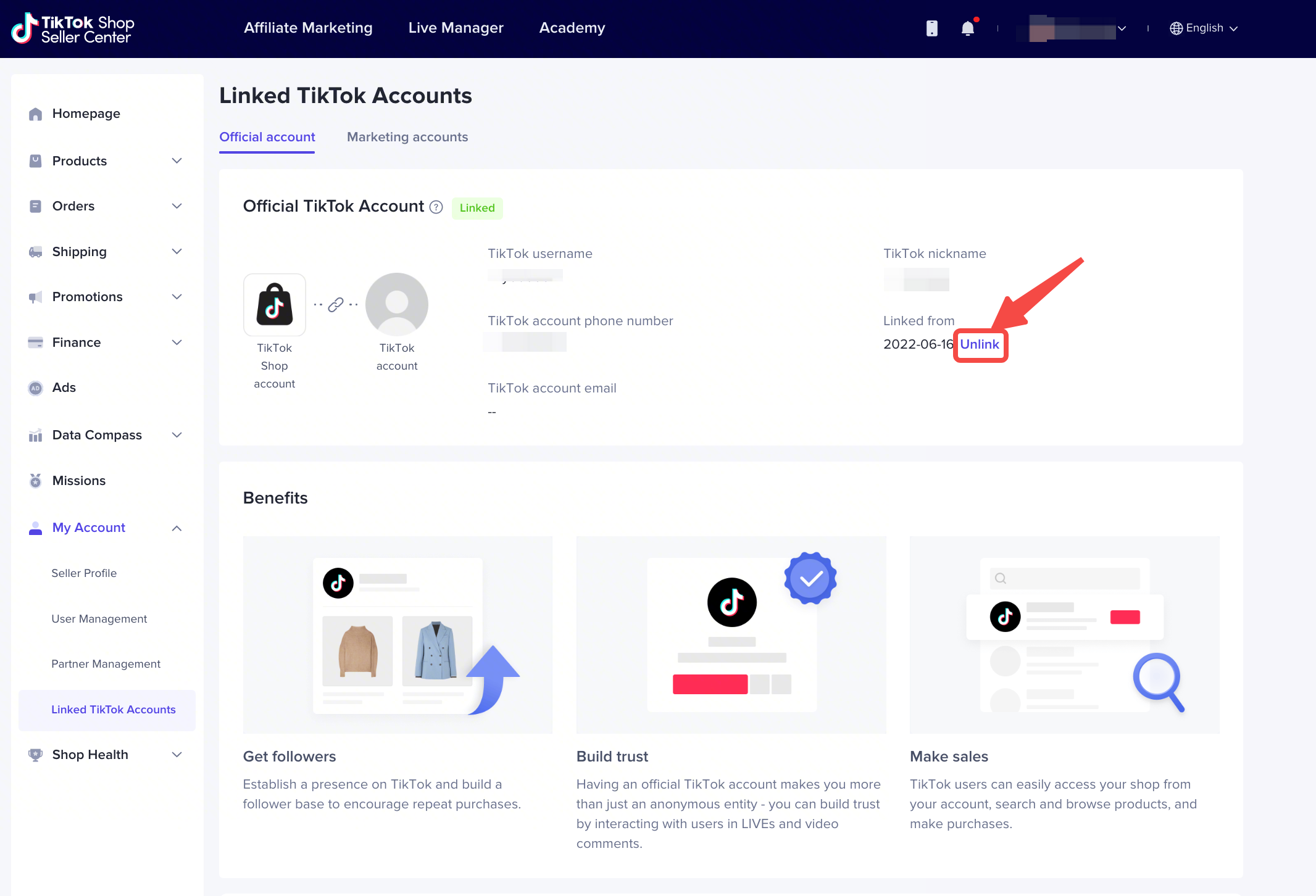
Log in to the TikTok Shop Merchant Center, enter the “Manage TikTok Accounts” interface in “Linked TikTok Accounts“, and click “Unlink” in the “Official Account” to unbind the official account from the shop.
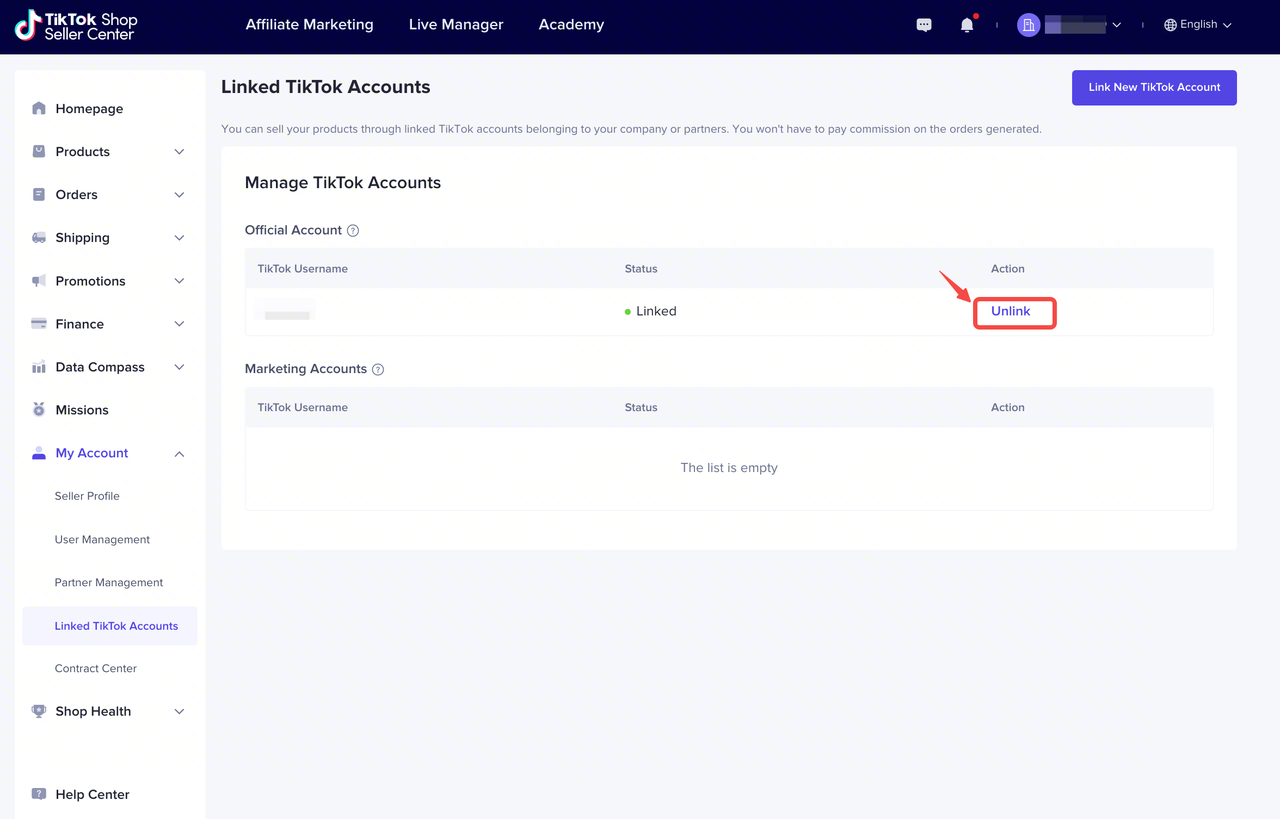
Log in to the TikTok Shop Seller Center, enter the “Official account” interface in “Linked TikTok Accounts” of “My Account” module, and click “Unlink” button to unlink the official account from the shop.
What’s the impact of unbinding official accounts?
The products in the store will not be automatically synchronized to the showcase of the account’s TikTok profile page, but these products can continue to be sold through livestream and videos. If you want to continue to sell these products, you need to add them again through the Affiliate.
If the short video released by the official account sells Affiliate products through the yellow cart, the yellow cart in the short video will stop being displayed;
If you have previously placed e-commerce advertisements for videos of this TikTok account, the advertisements outcome may be affected;
Why is there a [store] entrance instread of [showcase] in my profile page after binding the official account?
The official account’s profile page has been upgraded to display the [Store page] entrance to help merchants cultivate a stable mind for users to enter the store.
How to modify shopname?
Shop name can be modified once a month at most.
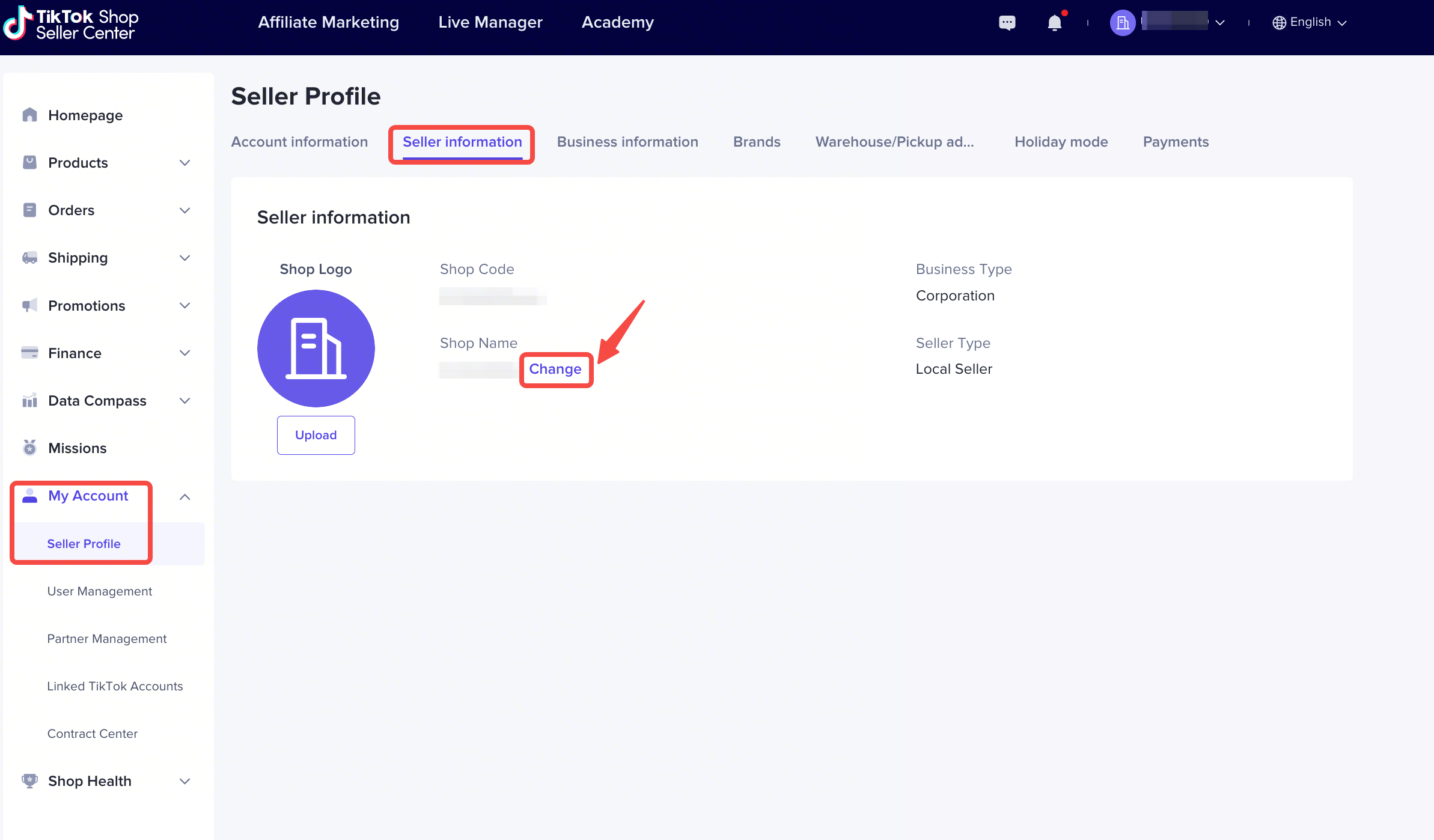
Log in to the TikTok Shop Merchant Center, enter the “Merchant Profile” interface in “My Account”, select “Store Information“, and click the “Change” button next to “Store Name” to modify.
The TikTok Seller App does not currently support changing the shop name. Please change the shop name from the above PC path.
How to modify official account name(nickname)?
Before upgrade:
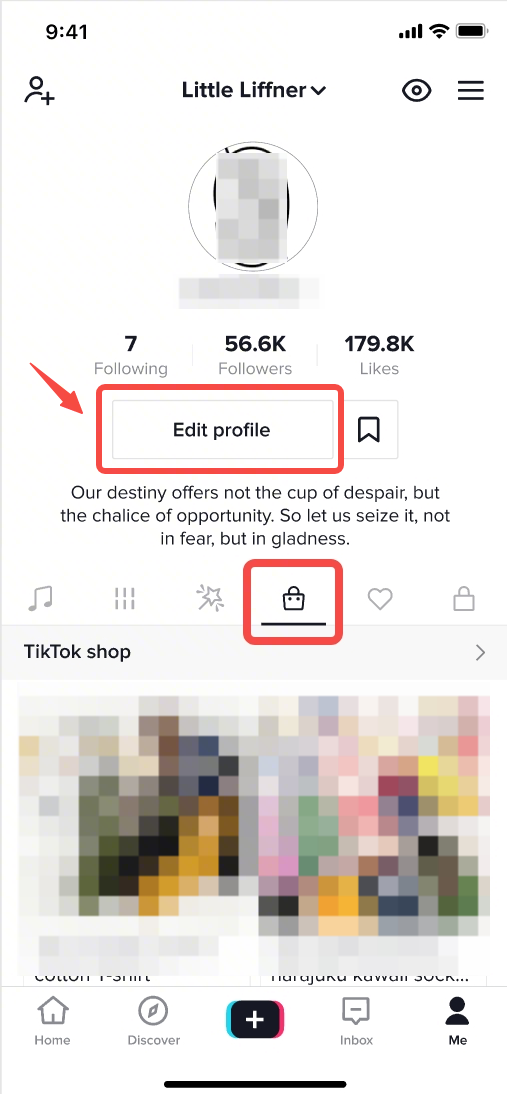
Enter TikTok App, then go to the Profile page in the lower right corner, and click ‘Edit Profile’ to modify name
After upgrade:
Modify the shop name of the bound shop, the name will be automatically synchronized to the official account name.
Why is my official account name and shop name the same after binding the official account?
This is the benefit of binding the official account. After binding, the official account name will automatically use the shopname, which helps the merchant to more accurately express the corporate identity and enhance the sense of trust.
Why did the upgrade of the official account fail?
When your store name is used to synchronize to your official account name, the synchronization fails because the length exceeds 30 characters, so you need to modify the shop name again to meet the rules and keep it consistent with the official account name.
Why can’t I change my shop name?
There are two possible reasons:
Your shop name is occupied by a nexisting shop name, please select another shop name;
Your shop name is not compliant and has not passed the system review, please choose another shop name;
Why can’t I modify the name of my official account?
Because your shop has been bound to the official account and the official account has been upgraded, the shop name is required to be consistent with the official account name. So you can only modify the official account name synchronously by modifying the shop name.