


中文版
1.功能介绍
“促评券” 是 TikTok Shop 的一款促销工具,旨在助力您收集详细的产品评价。由卖家承担优惠券的出资成本,系统会自动向符合评价条件的买家发放该优惠券。这样能激励消费者分享更详实的反馈,进而帮您提升产品的可信度、转化率和复购率。
2.预期收益
生成可信的详细评价:激励买家留下带图 / 视频、文字≥11 字的丰富评价,促进转化。
提升产品可信度:通过鼓励优质评价,帮您搭建顺畅的评价收集流程,强化产品可信度与消费者信任。
推动销量增长:详实优质的反馈能增强购物者信心,带来更多转化和复购。
3.如何创建促评券
第一步:登录商家后台
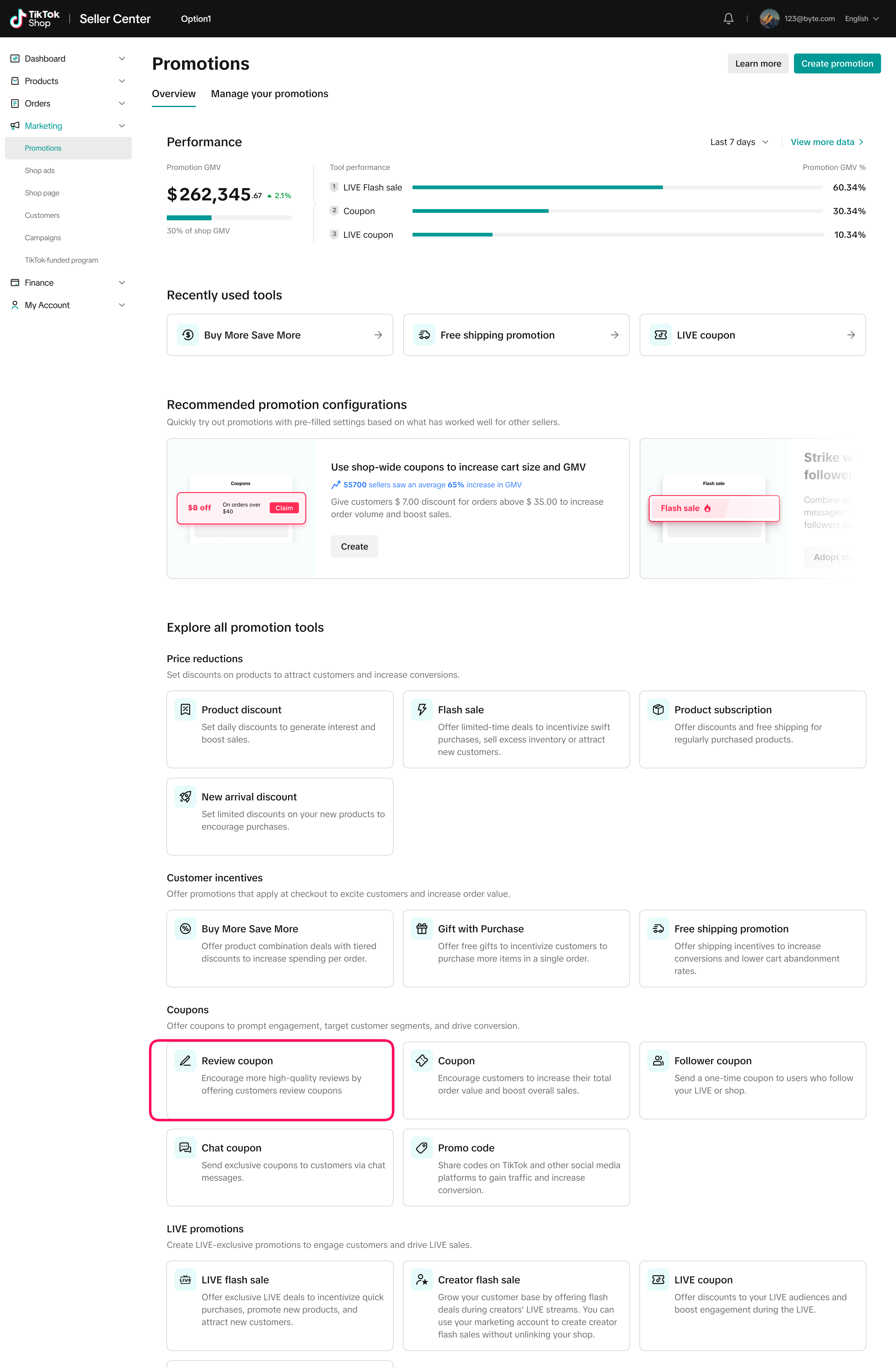
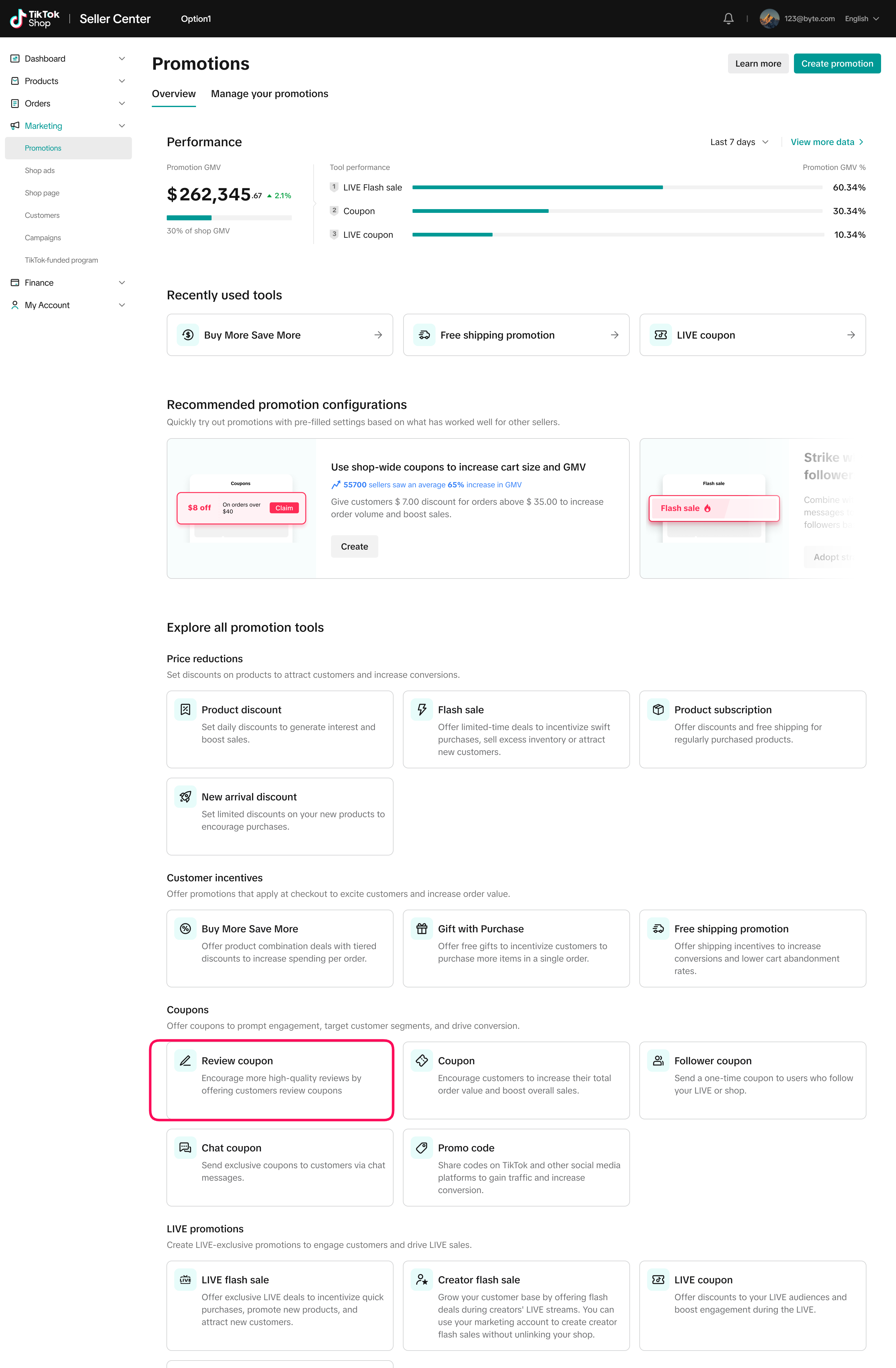
首先在左侧菜单栏点击【营销】,然后选择【促销活动】;
在【优惠券】板块中,找到【促评券】;
点击【创建】,即可开始设置你的促销活动。
第二步:创建优惠券
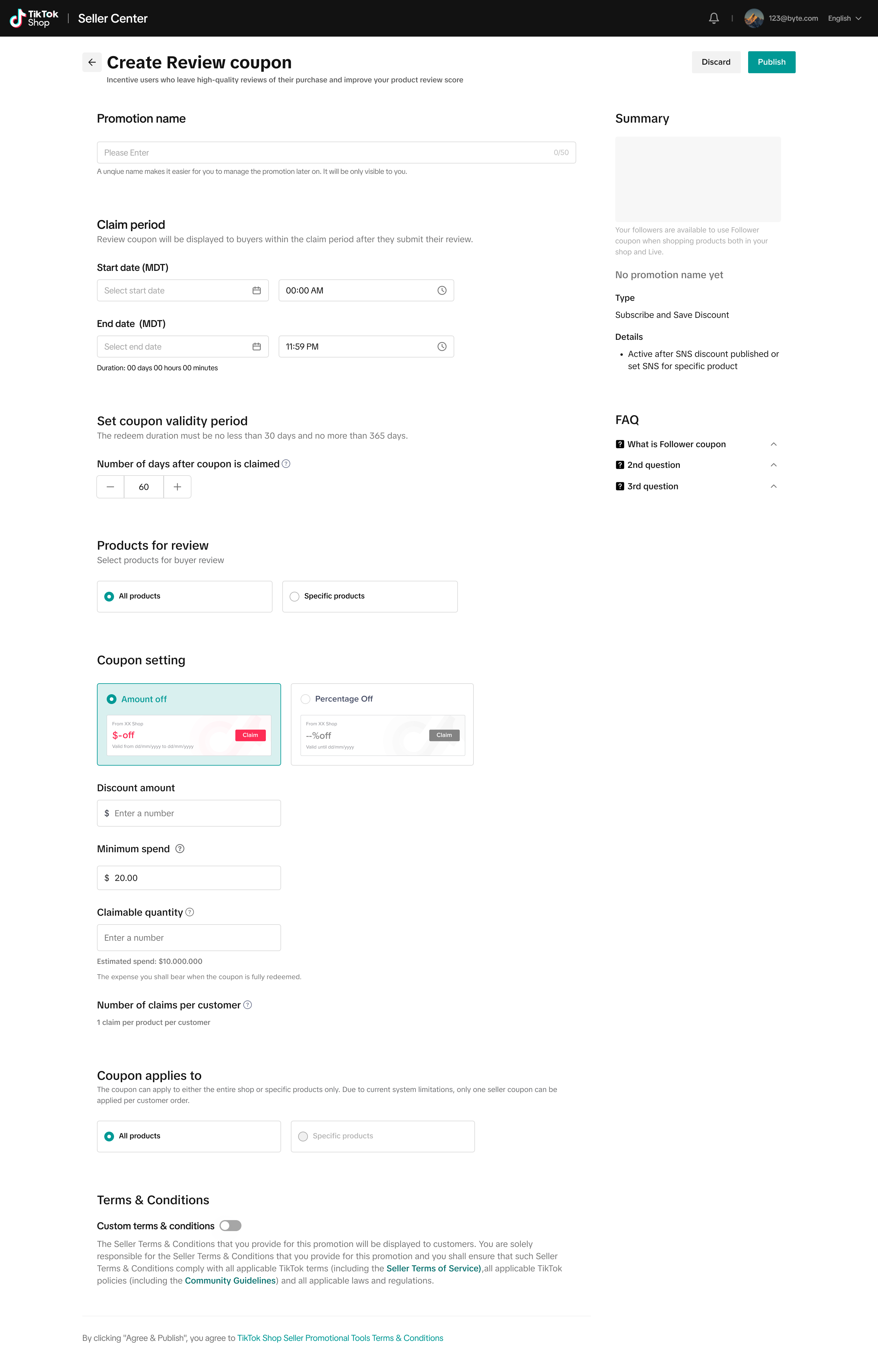
进入创建页面后,需设置以下促销详情:
促销名称:建议设置独特名称,方便后续管理该促销活动。
申领周期:指买家提交符合要求的评价并领取优惠券的时间段,最短 30 天,最长 180 天。
优惠券有效期:指优惠券领取后可使用的时长,默认 60 天,最长 180 天。
优惠券类型设置:可选择 “固定金额券” 或 “百分比折扣券”:
固定金额券:最低需设置减免 3 美元。
折扣范围:百分比折扣券可设置 5%~50% 的折扣比例。
温馨提示:为了避免糟糕用户体验(例如 “满 50 美元享 20% 折扣,却限制最高仅减 1 美元”),百分比折扣券不可设置 “最高折扣上限”。建议通过 “可申领数量” 字段控制预算风险 —— 比如若设置 “满 30 美元享 20% 折扣”(折扣金额可能随订单金额升高而增加),可限制优惠券的申领数量,避免超支。
商品选择:可将该优惠券应用于店铺内的全部商品。
触发条件:当用户为符合条件的商品提交优质详评(文字≥11 字 + 含图片 / 视频等媒体内容)时,系统会自动发放该优惠券。
第三步:管理促销活动
创建活动后,进入【管理你的促销活动】标签页,即可按状态分类查看所有促销活动的概况。在此页面,你可执行多项操作,例如查看活动数据、复制现有活动,或停用目标活动。
第四步:查看活动效果
查看促评券的活动效果有两种方式:
方式一:进入【管理你的促销活动】标签页,选中目标促评券活动,在 “操作” 栏下点击【查看数据】,即可查看该活动的具体效果。
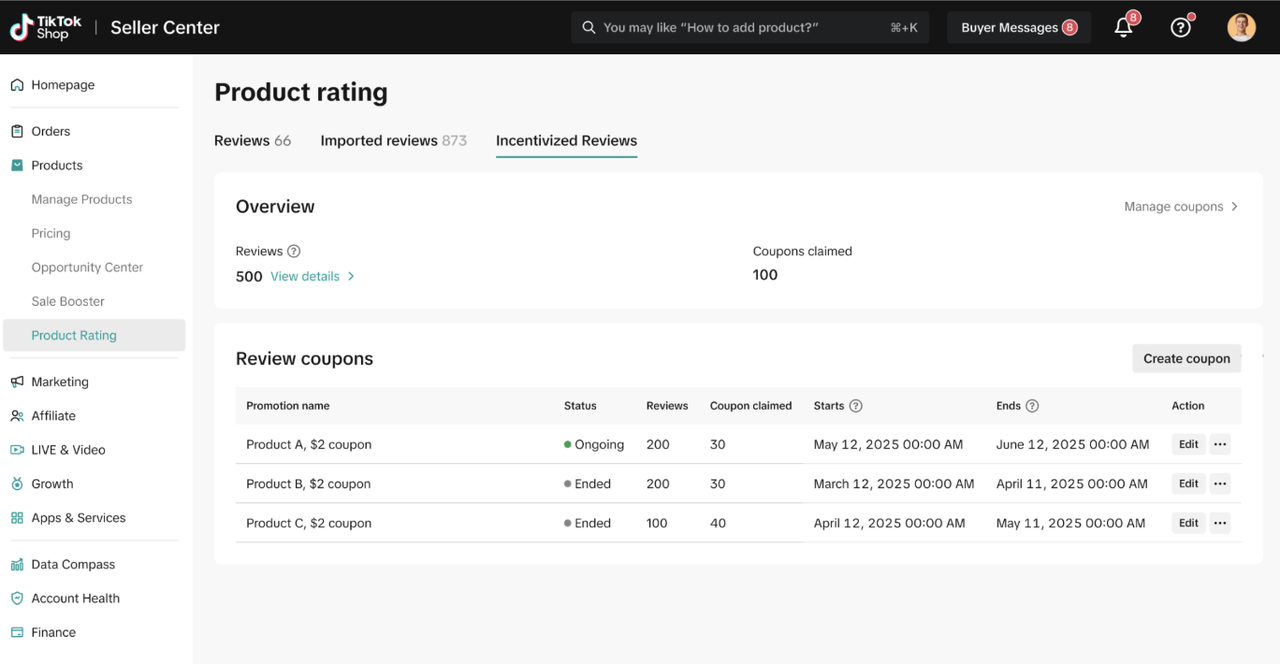
方式二:在商家后台左侧菜单栏中,选择【商品】>【商品评分】;在【激励评价】标签页下,将显示包含 “进行中” 及 “已结束” 促评活动详情的表格。如需了解更多信息,可参考《商品评分功能指南》。
4.C
端消费者体验
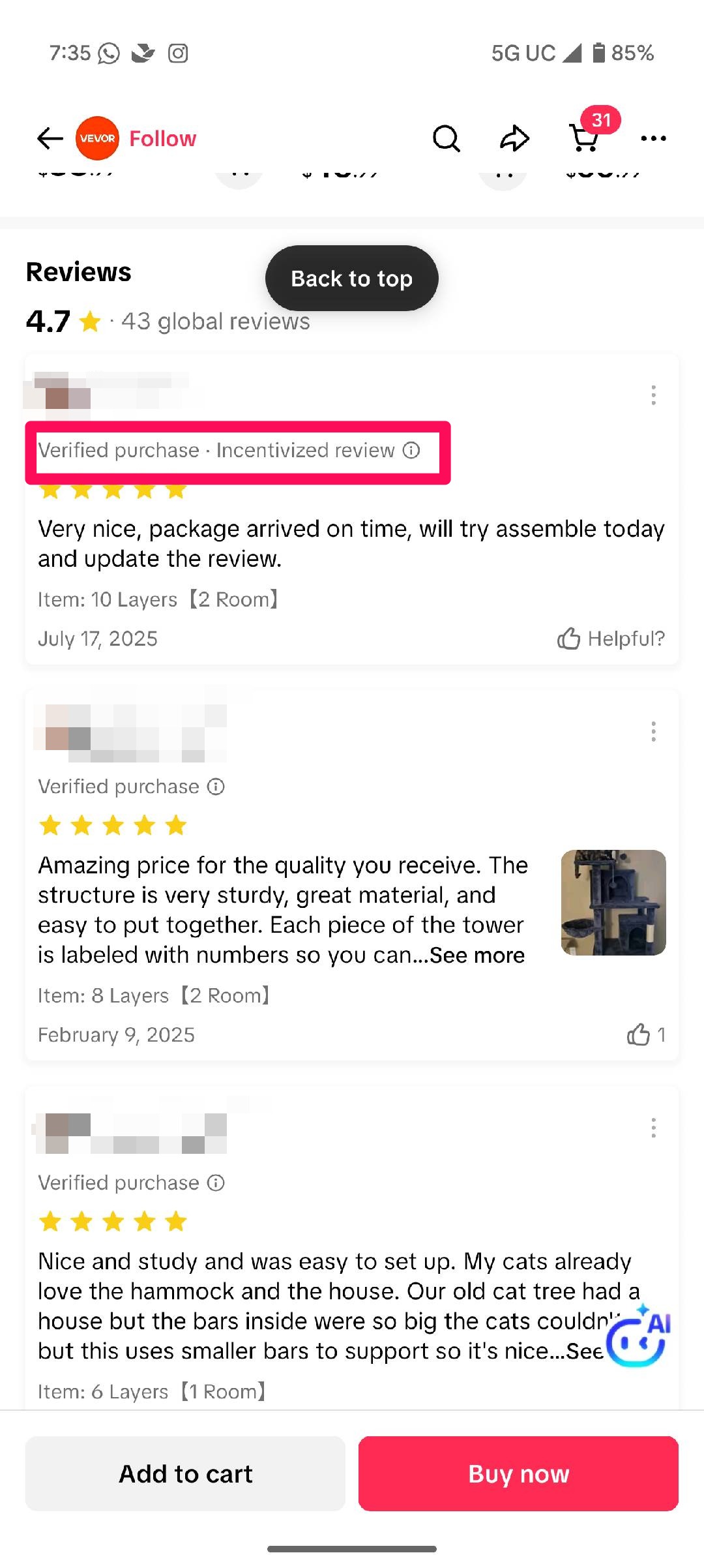
通过促销活动产生的评价,将带有 “已验证购买・激励评价”(Verified Purchase Incentivized Review)标识。
- Q&A
Q:消费者领取促评券需满足哪些条件?
A:消费者需先购买指定商品,再提交包含至少 11 字文字 + 图片 / 视频等媒体内容的商品评价,且该评价需通过 TikTok 平台审核并符合要求,方可领取促评券。
Q:负面评价是否符合促评券领取条件?
A:符合。只要评价满足 “11 字以上 + 含媒体内容” 的要求,且通过平台审核,无论评价是正面还是负面,买家均可领取促评券。
Q:促评券可与其他促销活动叠加使用吗?
A:促评券可与单品 / 多品促销(如商品折扣、秒杀、商品订阅、早鸟价、多买多省、随单赠品)及包邮促销叠加;但不可与其他卖家优惠券(包括常规优惠券、粉丝优惠券、促销码)叠加使用。
Q:同一时间可运行多个促评券活动吗?
A:不可以。同一时间仅能有 1 个促评券活动处于生效状态;若需创建新促评券,需确保其起止时间不与现有活动重叠。
Q:单个促评券活动最多可选择多少件商品?
A:单个促评券活动最多可选择 2000 件商品。
Q:通过促评券活动获得的评价,会标注 “来自促销活动” 吗?
A:会。通过该促销活动产生的评价,将带有 “已验证购买・激励评价”(Verified Purchase Incentivized Review)标识。
Q:每件商品最多可获得多少条 “卖家出资激励的评价”?
A:每笔带评价的订单均单独计数。例如:同一消费者分两笔订单购买同一件商品,并分别提交评价,可领取 2 张促评券;但需注意,消费者每笔订单仅可使用 1 张促评券。
English Version
1.Product Overview
The Review Coupon is a TikTok Shop promotion tool designed to help you collect detailed product reviews. You fund the coupon, and our system automatically issues it to buyers who meet the review criteria. This incentivizes customers to share richer feedback, boosting your product credibility, conversions, and repeat purchases.
2.Key Benefits
Generate Credible Detailed Reviews: Incentivize buyers to leave rich reviews with images/videos and detailed text (11 words) to drive conversions.
Enhance Product Credibility: By encouraging high-quality reviews, this feature helps you establish a seamless review collection process that enhances product credibility and strengthens customer trust.
Boost marketplace growth: Detailed, high-quality feedback builds shopper confidence, leading to more conversions and repeat purchases.
3.How It Works
Step 1: Log in to Seller Center
From the left-hand menu, click Marketing, select Promotions.
In the Coupons section, find Review Coupon.
Click Create to start setting up your promotion.
Step 2: Create the coupon
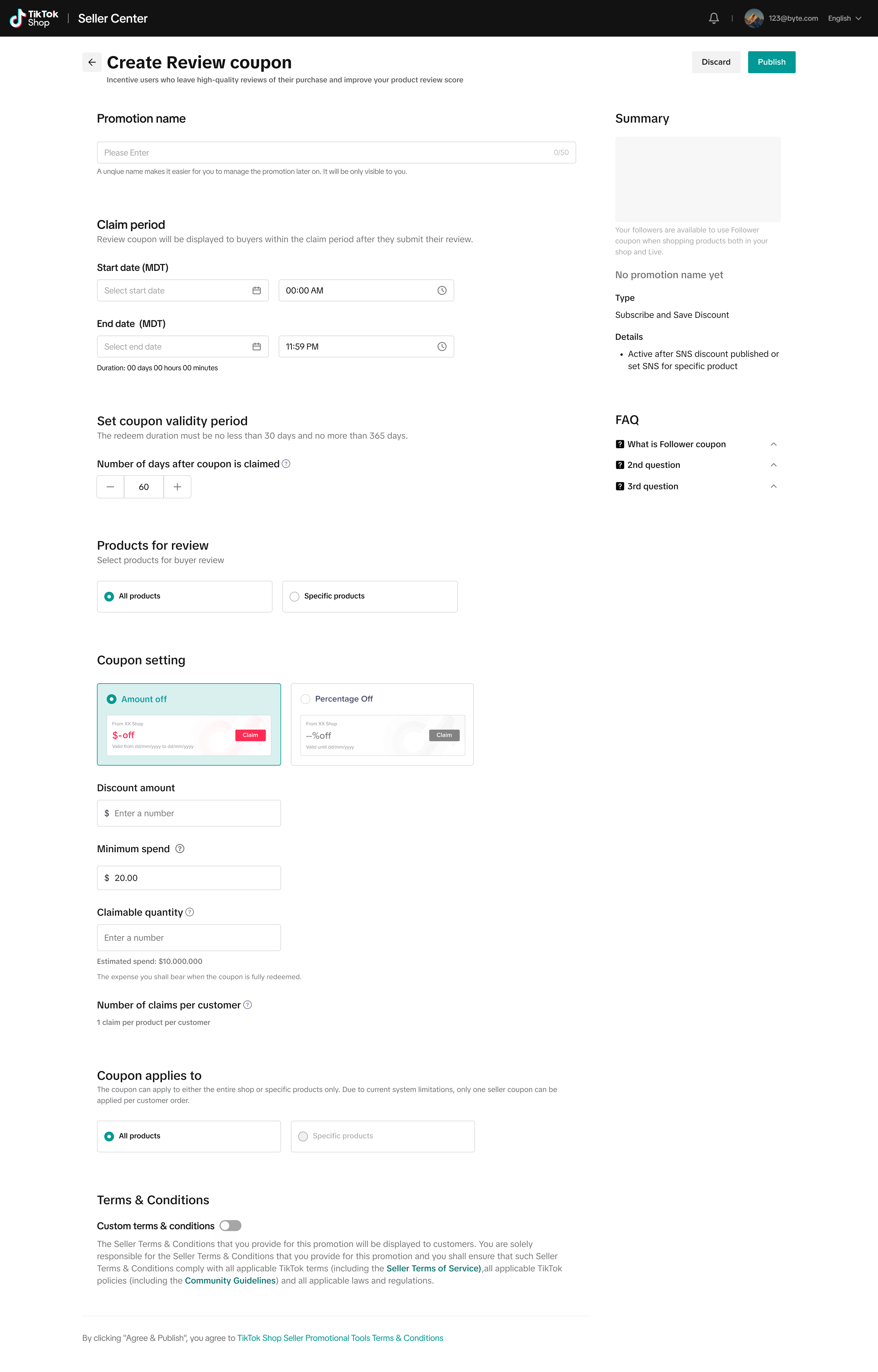
On the creation page, you’ll set up the promotion details
Promotion name: A unique name to help you manage the promotion
Claim period: The duration during which buyers can submit a qualifying review and receive a coupon. The minimum duration is 30 days and the maximum is 180 days
Coupon validity period: How long the coupon is valid after it’s claimed, with a default of 60 days and a maximum of 180 days.
Coupon settings: You can choose between a fixed-amount coupon or a percentage-off coupon.
Fixed amount: Must be at least $3 off.
Discount range: You can set percentage-off coupons between 5% and 50%.
Pro tip: You can’t set a maximum discount for percentage-off coupons. This prevents bad user experience (e.g., 20% off $50 orders, capped at $1). Instead, we recommend using the claimable quantity field to manage budget exposure. For example, if you set 20% off $30 orders, the discount could grow large, limit the number of claimable coupons to stay in control.
Product selection: You can apply the coupon to all products in your store.
Trigger: The coupon is automatically issued when users submit VHQ reviews (11+ words + media) for a qualifying product
Step 3: Manage promotions
After creating a promotion, go to the Manage Your Promotions tab to view an overview of all promotions by status. From there, you can take actions such as viewing campaign data, duplicating a promotion, or deactivating it
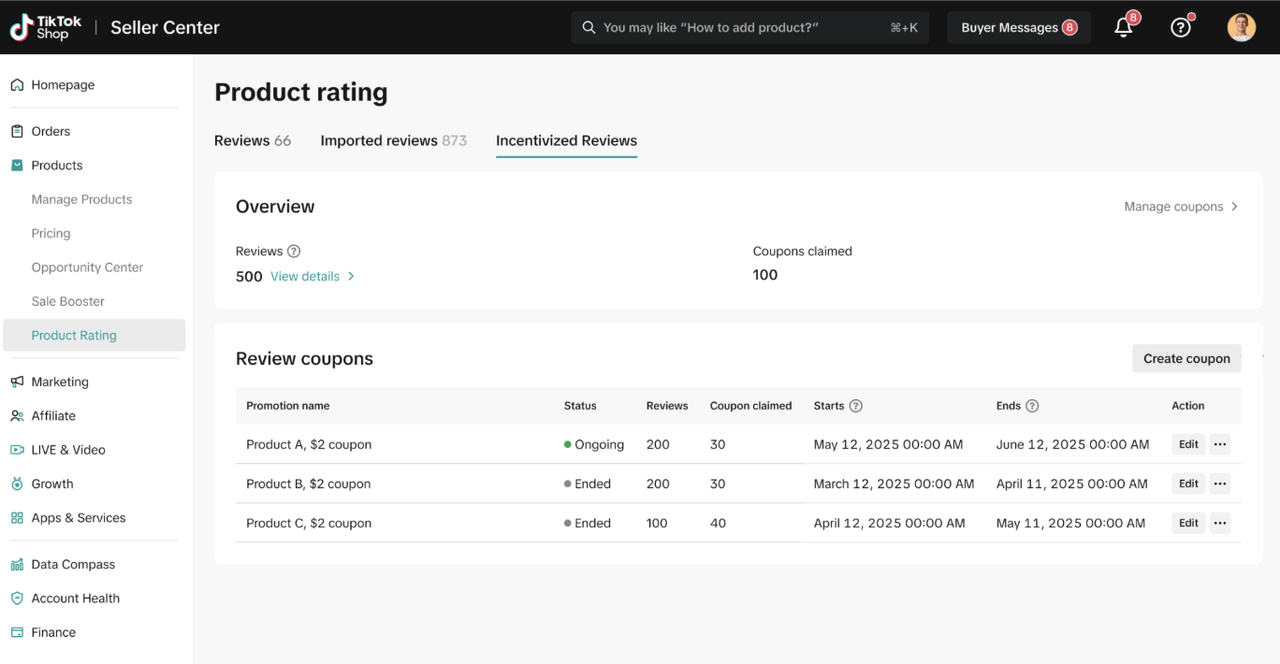
Step 4: Reviewing performance
There are two ways to review the performance of your review coupons:
Option 1: Go to the Manage Your Promotions tab, select your Review Coupon promotion, and click View Data under Action to see its performance.
Option 2: In Seller Center, go to the left-hand menu and select Products > Product Rating. Under the Incentivized Review tab, you’ll see a table with details of both ongoing and past review promotions. For more information, refer to the Product Ratings feature guide.
4.Customer’s Experience
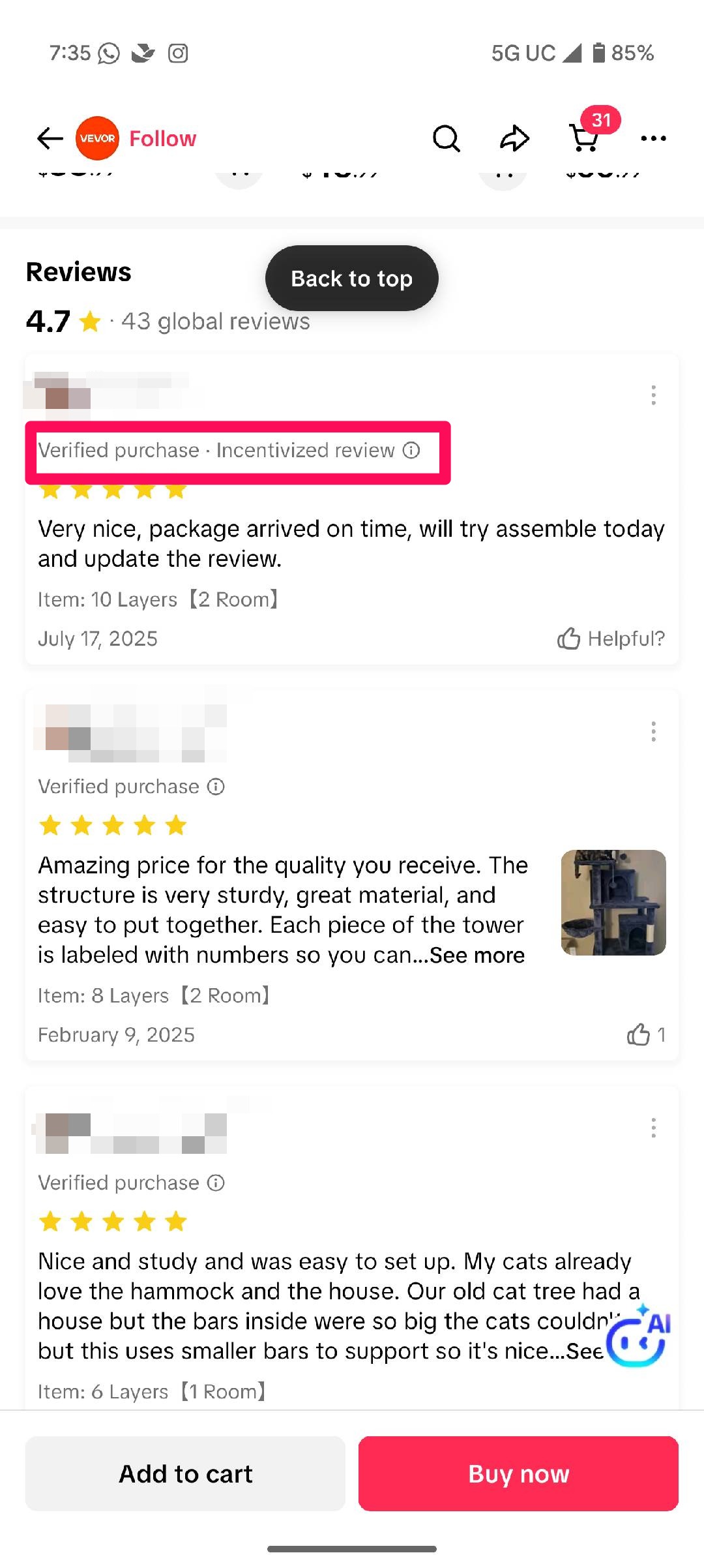
Reviews from promotional activity will be labeled with an “Verified purchase Incentivized Review” tag.
5.Q&A
Q: What are the conditions for a consumer to receive a review coupon?
A: To get a coupon, a consumer must purchase one of the specified products and submit a product review of at least 11 words, along with media (pictures or videos). The review must also be approved by TikTok and meet the requirements.
Q: Do negative reviews qualify for a coupon?
A: Yes, as long as the review meets the requirements (11+ words and media) and is approved by the platform, a buyer will receive a coupon regardless of whether the review is positive or negative.
Q: Can review coupon be used with other promotions?
A: Review coupons can be combined with single or multi-product promotions (such as product discounts, flash sales, product subscriptions, early access deals, Buy More Save More, and Gift with Purchase) and free shipping promotions. However, they can’t be stacked with other seller coupons, including regular, follower, or promo codes
Q: Can I have multiple review coupon promotions running at the same time?
A: No, there can be only one active review coupon at a time. However, you can create a new review coupon if its start and end dates don’t overlap with an existing promotion.
Q: What is the maximum number of products I can select for a review coupon promotion?
A: You can select up to 2,000 products for a single review coupon promotion
Q: Will the product review indicate it was received through a promotion?
A: Yes. Reviews from promotional activity will be labeled with an “Verfied purchase Incentivized Review” tag.
Q: How many seller-funded reviews can each I get for each product?
A: Each order with a review counts separately. For example, if a shopper buys the same product twice in different orders and reviews both, they can receive 2 coupons. However, shoppers can only use one review coupon per order.